On this page
A WebRTC signaling server (or signalling server, if you spell it the British way) is the part people expect to be hard and is actually the smallest piece of the stack. It passes three kinds of message between two browsers, an offer, an answer and ICE candidates, and then gets out of the way. No media touches it.
What does take effort is running it properly: TLS, WebSockets through a reverse proxy, idle timeouts, restarts. That is where most first attempts break, so that is where this guide spends its time.
One note if you arrived from our old signaling article. It was built on SimpleWebRTC's signalmaster, and that project is now officially deprecated, pinned to a Socket.IO version old enough that it needed a patch just to start. Don't build on it. The server below replaces it with about sixty lines you fully own.
What a signaling server does in WebRTC
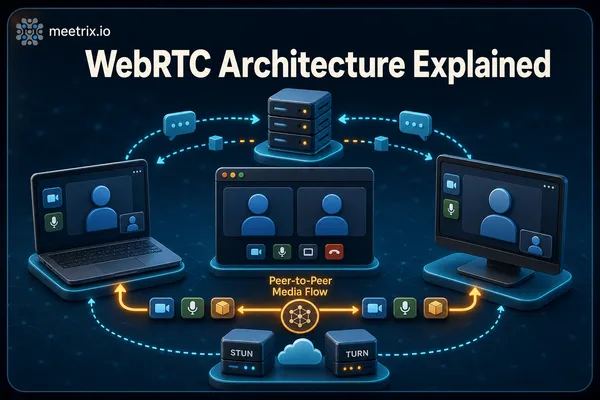
WebRTC can connect two browsers directly, but neither browser knows the other exists. Signaling is how they find out. Peer A creates an SDP offer describing its codecs and media, sends it through your server, and peer B replies with an answer. While that happens, both sides discover network candidates and trickle them across the same channel. To see what an offer actually contains, paste one into our SDP inspector.
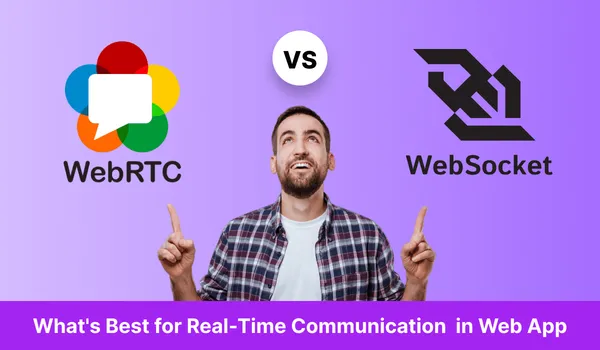
The WebRTC spec deliberately does not say how those messages travel. WebSockets are the default choice because they are bidirectional and every browser has them. That is the whole WebRTC vs WebSocket split in one line: the WebSocket carries the setup, WebRTC carries the media. If you want the full picture of where signaling sits next to STUN, TURN and media servers, how WebRTC works end to end walks through the whole connection flow.
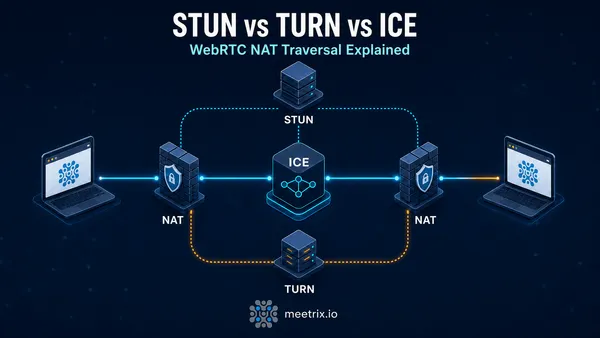
Signaling is not NAT traversal
Is there a WebRTC signaling protocol?
Not a mandatory one. The standards fix the SDP format and the offer and answer model (JSEP, now RFC 9429), but the messages that carry them are yours to design. In this guide that is three JSON message types over a WebSocket. If you would rather reuse an existing protocol, SIP over WebSocket and XMPP with Jingle are the usual picks, and XMPP is what Jitsi Meet runs on.
WebRTC signaling server open source options in 2026
Before writing any code, check whether you need a standalone signaling server at all. If you are running a media server, you almost certainly don't.
| Option | What you get | Use it when |
|---|---|---|
| Your own server on ws | A plain WebSocket relay with room logic you write | One-to-one calls or small meshes where you want no client library lock-in |
| PeerJS Server | A ready-made broker for the PeerJS client | You already use PeerJS in the browser |
| Socket.IO | Rooms, reconnection and fallbacks built in | Your app already speaks Socket.IO for other features |
| Signaling built into a media server | Janus has its HTTP and WebSocket API, LiveKit has its own protocol and SDKs, Jitsi Meet uses XMPP through Prosody | Group calls. The media server needs to be in the signaling loop anyway |
| SimpleWebRTC signalmaster | Deprecated, unmaintained | Never for new work |
My take: for anything beyond four or five participants, stop and pick a media server from our open source media server comparison instead. Mesh calls fall apart quickly because every browser uploads a separate stream to every other browser, and a signaling server can't fix that.
Build a signaling server for WebRTC with Node.js
The server below handles rooms of two, relays offers, answers and candidates, tells peers when the other side leaves, and pings clients so proxies don't drop idle connections. Install Node.js 24 LTS from NodeSource on Ubuntu 24.04 or 26.04:
curl -fsSL https://deb.nodesource.com/setup_24.x | sudo -E bash -
sudo apt install -y nodejs
node --version
Create the project and add ws, the WebSocket library most Node signaling code is built on:
sudo mkdir -p /opt/signaling && cd /opt/signaling
sudo npm init -y
sudo npm pkg set type=module
sudo npm install ws
Then /opt/signaling/server.js:
import { WebSocketServer, WebSocket } from 'ws';

const PORT = Number(process.env.PORT || 8080);
const MAX_PEERS = 2;
const rooms = new Map(); // room name -> Set of sockets

const wss = new WebSocketServer({ host: '127.0.0.1', port: PORT });

function send(ws, msg) {
  if (ws.readyState === WebSocket.OPEN) ws.send(JSON.stringify(msg));
}

wss.on('connection', (ws) => {
  ws.isAlive = true;
  ws.on('pong', () => { ws.isAlive = true; });

  ws.on('message', (data) => {
    let msg;
    try { msg = JSON.parse(data.toString()); } catch { return; }

    if (msg.type === 'join' && typeof msg.room === 'string') {
      const peers = rooms.get(msg.room) || new Set();
      if (peers.size >= MAX_PEERS) return send(ws, { type: 'full' });
      peers.add(ws);
      rooms.set(msg.room, peers);
      ws.room = msg.room;
      for (const peer of peers) if (peer !== ws) send(peer, { type: 'peer-joined' });
      return;
    }

    // offer, answer and candidate messages are relayed untouched
    if (['offer', 'answer', 'candidate'].includes(msg.type) && ws.room) {
      for (const peer of rooms.get(ws.room) || []) if (peer !== ws) send(peer, msg);
    }
  });

  ws.on('close', () => {
    const peers = rooms.get(ws.room);
    if (!peers) return;
    peers.delete(ws);
    for (const peer of peers) send(peer, { type: 'peer-left' });
    if (peers.size === 0) rooms.delete(ws.room);
  });
});

// Ping every 30 seconds and drop sockets that stopped answering
const heartbeat = setInterval(() => {
  for (const ws of wss.clients) {
    if (!ws.isAlive) { ws.terminate(); continue; }
    ws.isAlive = false;
    ws.ping();
  }
}, 30000);

wss.on('close', () => clearInterval(heartbeat));
console.log('signaling server listening on 127.0.0.1:' + PORT);
Two choices in there are deliberate. It binds to 127.0.0.1, so the only way in is through nginx and TLS. And it never inspects the SDP, it just forwards it. Validating room names and adding authentication (a signed token in the join message is enough) is the first thing to add before this faces the internet.
The browser side
The client uses the browser's own WebSocket and RTCPeerConnection. Grab the camera and microphone first with getUserMedia, then whoever is already in the room makes the offer when the second peer arrives:
const ws = new WebSocket('wss://signal.example.com');
const pc = new RTCPeerConnection({
  iceServers: [{ urls: 'stun:stun.l.google.com:19302' }],
});

// add your camera and microphone tracks to pc before the offer is created

ws.onopen = () => ws.send(JSON.stringify({ type: 'join', room: 'demo' }));

pc.onicecandidate = ({ candidate }) => {
  if (candidate) ws.send(JSON.stringify({ type: 'candidate', candidate }));
};

const pending = [];

ws.onmessage = async ({ data }) => {
  const msg = JSON.parse(data);

  if (msg.type === 'peer-joined') {
    await pc.setLocalDescription(await pc.createOffer());
    ws.send(JSON.stringify({ type: 'offer', sdp: pc.localDescription }));
  } else if (msg.type === 'offer' || msg.type === 'answer') {
    await pc.setRemoteDescription(msg.sdp);
    if (msg.type === 'offer') {
      await pc.setLocalDescription(await pc.createAnswer());
      ws.send(JSON.stringify({ type: 'answer', sdp: pc.localDescription }));
    }
    for (const c of pending.splice(0)) await pc.addIceCandidate(c);
  } else if (msg.type === 'candidate') {
    if (pc.remoteDescription) await pc.addIceCandidate(msg.candidate);
    else pending.push(msg.candidate);
  }
};
That pending queue is the bug nobody warns you about. Candidates can arrive before the remote description is set, and addIceCandidate throws when that happens. It hides on a fast LAN, where the description usually lands first, and shows up over slower links as calls that connect only some of the time. MDN's signaling and video calling guide covers the offer and answer flow in more detail if you want to extend this into renegotiation.
Deploy behind nginx with TLS
Browsers block ws:// from an HTTPS page, so you need wss:// and a certificate. Point a DNS name such as signal.example.com at the server, then install nginx and certbot:
sudo apt install -y nginx certbot python3-certbot-nginxCreate /etc/nginx/sites-available/signaling:
server {
    listen 80;
    server_name signal.example.com;

    location / {
        proxy_pass http://127.0.0.1:8080;
        proxy_http_version 1.1;
        proxy_set_header Upgrade $http_upgrade;
        proxy_set_header Connection "upgrade";
        proxy_set_header Host $host;
        proxy_read_timeout 3600s;
    }
}
Enable it and let certbot add the 443 listener and certificate for you:
sudo ln -s /etc/nginx/sites-available/signaling /etc/nginx/sites-enabled/
sudo nginx -t && sudo systemctl reload nginx
sudo certbot --nginx -d signal.example.com
The 60 second disconnect
proxy_read_timeout, nginx closes any proxied connection that stays silent for 60 seconds. A peer waiting alone in a room is silent, so it gets disconnected right before the other person joins. The long timeout plus the 30 second ping in server.js prevents it.
Run the server with systemd rather than a terminal session, so it restarts on failure and on reboot. Create a system user and /etc/systemd/system/signaling.service:
sudo useradd --system --home /opt/signaling --shell /usr/sbin/nologin signal[Unit]
Description=WebRTC signaling server
After=network.target
[Service]
User=signal
WorkingDirectory=/opt/signaling
Environment=PORT=8080
ExecStart=/usr/bin/node server.js
Restart=on-failure
LimitNOFILE=65000
[Install]
WantedBy=multi-user.targetsudo systemctl daemon-reload
sudo systemctl enable --now signaling
sudo journalctl -u signaling -fTest it and scale it
You can check the relay without writing a page. Open two terminals and connect both with wscat:
npx wscat -c wss://signal.example.com
> {"type":"join","room":"test"}
When the second terminal joins, the first one should print {"type":"peer-joined"}. Anything you send as {"type":"offer"} from one side appears on the other. If the connection fails outright, run sudo nginx -t and check that port 443 is open in your firewall or security group. If signaling works but the call still never connects, open chrome://webrtc-internals and follow our notes on debugging WebRTC in Chrome, Firefox and Safari.
On scale, the honest answer is that signaling is cheap. Messages are tiny and only flow while a call is being set up, so a small VM carries a lot of rooms. The first limit you hit is usually open file descriptors, which is why the unit file raises LimitNOFILE.
The real constraint is that rooms live in one process's memory. The moment you run two instances behind a load balancer, peers in the same room can land on different processes and never see each other. Either pin clients to one instance with sticky routing, or move room membership into Redis pub/sub. Most teams never need to, because by the time a single process is not enough they have moved group calls onto a media server.
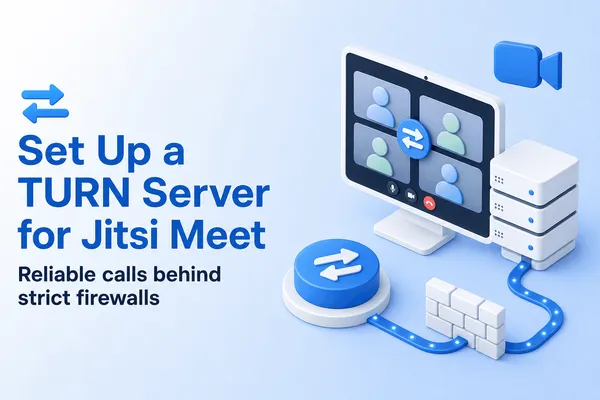
And plan for TURN from day one. Roughly speaking, the calls that fail in production are the ones where peers sit behind symmetric NAT or firewalls that block UDP, and only a relay fixes those. Setting up a Coturn TURN server covers the configuration, and the same server works for any WebRTC app, not only Jitsi.
Frequently Asked Questions
Does WebRTC need a signaling server?
Yes. Two browsers have to swap an SDP offer, an SDP answer and ICE candidates before media flows, and WebRTC leaves the transport for that up to you. A small WebSocket server is the usual choice, but anything that passes messages between the peers works.
Does the signaling server carry the audio and video?
No. It only relays setup messages, a few kilobytes per call. Media goes peer to peer, through a TURN server when a direct path is blocked, or through a media server such as Jitsi Videobridge in group calls.
Is there a free WebRTC signaling server?
No public one worth depending on, but free open source servers are easy to run. PeerJS Server is the easiest drop-in if you use the PeerJS client. Janus, LiveKit and Jitsi Meet ship their own signaling, so you don't need a separate server with those.
Which port should a signaling server use?
Run the Node process on a local port such as 8080 and put nginx in front of it on 443 with a real certificate. Corporate firewalls allow outbound 443, and browsers require wss:// on HTTPS pages.
Do I need Socket.IO for WebRTC signaling?
No. Socket.IO adds reconnection and rooms, but it forces the Socket.IO client on every peer. The plain ws library plus a few lines of room logic covers a one-to-one call, and the browser's built-in WebSocket is the only client you need.
How do I test a WebRTC signaling server?
Connect two terminals with npx wscat, send a join message for the same room from both, and check that the first one receives peer-joined. Then open chrome://webrtc-internals during a real call to confirm the offer, answer and candidates arrive.
Why do my WebSocket connections drop after about a minute?
nginx closes proxied connections that stay silent longer than proxy_read_timeout, which defaults to 60 seconds. Raise it in the location block and ping clients from the server every 30 seconds so peers waiting alone in a room stay connected.
Skip the TURN Setup Your Signaling Server Still Needs
A pre-configured Coturn TURN and STUN server on AWS, so calls that pass signaling but fail ICE behind strict NAT still connect.
Deploy Coturn from AWS Marketplace