Most explanations of WebRTC start with "it's peer-to-peer" and stop there, which is true for about the first thirty seconds of a call and misleading for everything after. There's a signaling server involved before any media moves, a negotiation process most people never look at, and a fork in the road between three completely different ways of routing media once more than two people join a call. Get the architecture wrong and you'll build something that works great in your own testing and falls over the moment a real user joins from a hotel WiFi network.
This is the piece that's usually missing: not "what is WebRTC" (a browser API for real-time audio, video, and data), but how the pieces actually fit together, and why so many WebRTC deployments hit a wall around 4-6 participants that nobody warned them about.
Quick answer
Jump to a section
The WebRTC architecture: three moving parts
Strip away the acronyms and WebRTC is three browser APIs working together. getUserMedia() grabs the camera and microphone and hands you a MediaStream. RTCPeerConnection is the workhorse: it negotiates codecs, handles NAT traversal, encrypts the media, and manages the actual connection to the other peer. RTCDataChannel rides alongside it for arbitrary binary or text data, chat messages, file transfer, game state, anything that isn't audio or video.
Those APIs are specified by the W3C WebRTC spec, and the network and codec rules under them come from the IETF. What trips people up is that none of these three, on their own, know how to find the other peer. RTCPeerConnection generates an offer full of codec preferences and network candidates, but it has no way to deliver that offer anywhere. That delivery problem is what signaling solves, and it's the part of the architecture the WebRTC spec deliberately leaves out.
The WebRTC architecture diagram
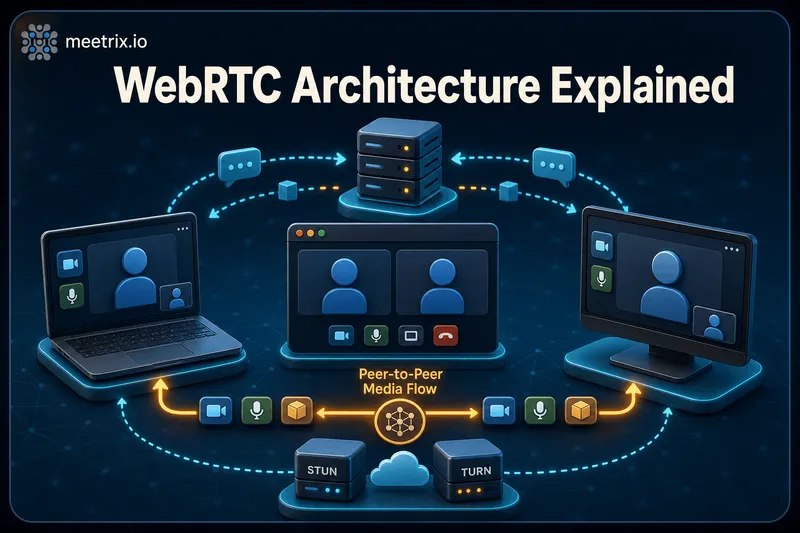
Every WebRTC diagram worth its pixels shows two separate paths, not one. Here is the minimum version:
Signaling carries setup information through a server. Media, once negotiated, takes a separate path.
That split matters more than the diagram makes it look. The signaling path and the media path use completely different transports, different servers, and often fail independently of each other. A call can signal successfully (both sides see "connecting") and then never actually get media flowing, because ICE couldn't find a working route. That's the single most common WebRTC support ticket, and it's a NAT traversal problem, not a signaling one. If you're chasing that specific failure, our STUN vs TURN vs ICE breakdown covers it in full; this piece stays focused on the architecture around it.
WebRTC signaling: the part the spec leaves out
Signaling exists to answer one question for each peer: "here's what I support and how to reach me, what about you?" Concretely, that's an SDP offer generated by the caller, an SDP answer from the callee, and a stream of ICE candidates from both sides as they're discovered. None of that is media. It's metadata, and it has to arrive somewhere both peers are already connected to, which is why you need a server at all before any peer-to-peer connection exists.
The WebRTC spec doesn't define what that server looks like on purpose. It could be a WebSocket server pushing JSON messages, a SIP proxy if you're bridging into existing telephony infrastructure, or even an HTTP endpoint your clients poll. We've built it with WebSocket in most of our own deployments, mainly because the low latency matters for ICE candidates that need to arrive quickly, but SIP is the right call if you're already running a PBX. If you're deciding between the two for a broader real-time app, not just the signaling layer, our WebRTC vs WebSocket comparison goes into that tradeoff.
Which WebRTC signaling protocol to use
There isn't a single WebRTC signaling protocol, and that surprises people coming from SIP. In practice you'll meet four:
- Your own JSON messages over WebSocket. The default for custom apps, and what most tutorials build.
- XMPP with Jingle, which is what Jitsi Meet speaks between the browser, Prosody and Jicofo.
- SIP over WebSocket, when the browser has to talk to a PBX or phone network.
- WHIP (RFC 9725), an HTTP-based standard from 2025 for pushing a stream into a media server or CDN. It's built for broadcasting from OBS or a browser, not for two-way calls.
If you're about to build the server side yourself, our guide to building a WebRTC signaling server covers the WebSocket version with Node.js and ws behind nginx, and the timeout bugs that break it in production.
One consequence of the spec leaving this open: two WebRTC apps from different vendors can't just talk to each other, even though they're both "WebRTC." The media negotiation is standardized. The signaling that gets them to the negotiation isn't, so interop between separate platforms needs a bridge or a shared signaling protocol, not just "both use WebRTC."
How WebRTC works, step by step
Here's what actually happens between clicking "join call" and hearing audio, in order:
- Media capture.
getUserMedia()requests camera/mic access and returns aMediaStream, which gets attached to the localRTCPeerConnection. - Offer creation. The calling peer's
RTCPeerConnectiongenerates an SDP offer describing supported codecs, resolutions, and initial network info. - Offer delivery. That offer goes to the signaling server, which forwards it to the callee. This is the first point where "WebRTC" leans entirely on infrastructure outside the spec.
- Answer. The callee's
RTCPeerConnectionprocesses the offer, generates its own SDP answer, and sends it back through the same signaling channel. - ICE candidate exchange. Both sides start gathering host, server-reflexive, and relay candidates, trickling each one to the other peer as it's found rather than waiting to collect everything first.
- Connectivity checks. ICE tests candidate pairs and locks in whichever one actually connects, host-to-host first, then via STUN, then via TURN as the fallback.
- Media flows. Once a pair succeeds and DTLS handshakes complete, encrypted audio/video (and any data channel traffic) starts moving over that path, no longer touching the signaling server at all.
To see what a real offer or answer carries, paste one into our SDP inspector. It breaks down every media section, codec and ICE candidate line by line.
In code, the shape of steps 1-4 is genuinely small. This is the whole offer side, stripped to the essentials:
const stream = await navigator.mediaDevices.getUserMedia({ audio: true, video: true });
const pc = new RTCPeerConnection({ iceServers: [
  { urls: "stun:your-turn-server.example.com:3478" },
  { urls: "turn:your-turn-server.example.com:3478", username: "user", credential: "secret" },
] });

stream.getTracks().forEach((track) => pc.addTrack(track, stream));

pc.onicecandidate = (event) => {
  if (event.candidate) signalingChannel.send({ type: "ice-candidate", candidate: event.candidate });
};

const offer = await pc.createOffer();
await pc.setLocalDescription(offer);
signalingChannel.send({ type: "offer", sdp: offer });
Everything hard about WebRTC lives in what happens after you call these functions, not in the functions themselves. The API surface is small on purpose; the negotiation and network traversal underneath it is where deployments actually fail.
Media flow: mesh, SFU, and MCU
Two-person calls are the easy case: media goes straight from Browser A to Browser B (or through a TURN relay if a direct path doesn't exist), and that's the whole story. Group calls are where the architecture forks, because sending N-1 separate streams from every participant doesn't scale the way people assume.
| Approach | How it routes media | Upload cost per client | Where it breaks down |
|---|---|---|---|
| Mesh (P2P) | Every participant connects directly to every other participant | Grows with N-1 streams | Past 4-5 participants, upload bandwidth and CPU for encoding N streams becomes the bottleneck |
| SFU | Each client uploads once; the server forwards it to everyone else unchanged | Flat, one upload regardless of group size | Server bandwidth scales with participants, but no transcoding means it stays CPU-cheap even at scale |
| MCU | Server decodes every stream, mixes them into one composite, sends a single stream back | Flat, and lowest client CPU | Server CPU cost is high (decode + mix + re-encode per participant), and it adds latency |
When a WebRTC MCU still makes sense
An MCU is the right tool when the far end can only take one stream: a SIP phone or room system, a recording that should look like a single composed video, or a live stream to YouTube. That's why plenty of SFU platforms still mix one composite on the side for exactly those outputs, while everyone in the browser gets forwarded streams. Jitsi does this with Jibri, which records a composed view instead of mixing on the bridge.
Mesh is genuinely fine for a 1:1 call or a 3-person standup, and it's the simplest architecture to reason about because there's no media server at all. Past that, an SFU is almost always the right default: it doesn't touch the codec (no transcoding, so lower server CPU than an MCU), and it scales bandwidth-wise rather than compute-wise. Jitsi Videobridge, mediasoup, and Janus are all SFU implementations for exactly this reason. MCUs still show up in legacy telephony bridging and some broadcast setups where a single composite output genuinely matters, but for a browser-based video call, they're the less common choice these days. To estimate what a call of a given size needs per participant, try the video call bandwidth calculator.
If you're comparing specific open source SFU options for a real deployment, we've done a deeper pass on that in our guide to open source WebRTC media servers. This section is about which architecture to reach for, not which specific server.
Codecs and encryption: what's actually in the packets
On the audio side, Opus is the codec that matters (G.711 is also mandatory, mostly for telephony interop), and it's a genuinely strong one, it holds up well even down to 16-32 kbps, which is most of why WebRTC calls sound decent on bad connections. Video is messier: RFC 7742 requires browsers to support both VP8 and H.264, so there's always a codec in common, but VP9 sees wide use for its better compression, and AV1 support is spreading as hardware decoding catches up. Which codec actually gets negotiated depends on what both peers advertise in their SDP and what the browser and hardware can decode.
Encryption isn't a checkbox you toggle. WebRTC mandates DTLS-SRTP for every media stream as part of the spec, there's no unencrypted mode to fall back to. That's a real difference from a lot of older VoIP and RTP-based systems, where plain RTP was the default and encryption had to be added separately (and frequently wasn't). The DTLS handshake happens automatically as part of connection setup, using keying material derived during the ICE/DTLS negotiation, so you get encrypted media without writing any crypto code yourself.
Architecture mistakes that bite in production
A handful of these come up over and over in deployments we've supported:
- Building a mesh architecture and assuming it'll scale. It demos beautifully with three people in the same office. It falls over at ten, because every client is now encoding and uploading nine separate streams.
- Skipping TURN because it "worked in testing." Testing usually happens on the same WiFi network or an easy cone NAT. Symmetric NAT and locked-down corporate firewalls are common enough in the real world that skipping TURN quietly locks out a real slice of users, and their calls just hang on "connecting" with no obvious error.
- Not planning for simulcast. An SFU that only forwards a single resolution per stream forces every participant down to whatever the weakest connection can handle. Simulcast lets clients send multiple quality layers and the SFU picks per-viewer, which matters a lot once you have both mobile and desktop participants in the same call.
- Treating the signaling server as an afterthought. It's not part of the WebRTC spec, but it's still a production service that needs to handle reconnects, message ordering, and scale with concurrent users. A flaky signaling layer looks exactly like a broken WebRTC deployment from the outside.
Where Jitsi Meet fits into this architecture
Jitsi Meet is a practical example of most of what's above, wired together: Jitsi Videobridge is the SFU, jicofo handles session and conference logic, and it ships with its own signaling built on XMPP over WebSocket. It's already made the mesh-vs-SFU decision for you, which is a big part of why it holds up at meeting sizes that a naive mesh implementation never would.
If you're weighing whether to build a custom WebRTC stack from these primitives or start from something that already got the architecture right, self-hosting Jitsi Meet is usually the faster path. We run a pre-configured Jitsi Meet AMI for exactly that reason, so the SFU, TURN relay, and signaling are already deployed and configured rather than something you're assembling from scratch.
Want the video-conferencing side of Jitsi rather than the architecture underneath it? Our overview of what Jitsi actually is covers that. And once a call is running, our guide to WebRTC screen sharing and recording covers the piece that comes right after connection setup.
Frequently Asked Questions
How does WebRTC work?
Two browsers use a signaling server to swap SDP (what media they support) and ICE candidates (how to reach each other). Once ICE picks a working path, encrypted media flows peer-to-peer, through a TURN relay, or through a media server, depending on the deployment.
What is a signaling server in WebRTC?
It's the server that carries the SDP offer/answer and ICE candidates between two peers before a call connects. WebRTC's spec deliberately doesn't define it, so it's usually built on WebSocket, SIP, or plain HTTP polling. No signaling channel means no call, even though it never touches the media itself.
Does WebRTC need a server at all?
Yes, just not for the media. You need a signaling server to set up the call and, in most real deployments, a STUN/TURN server for NAT traversal. Only the actual audio and video can skip a server, and even that usually runs through an SFU once you go past a handful of participants.
Is there a standard WebRTC signaling protocol?
No. The spec leaves signaling to you. Most apps send JSON over WebSocket; Jitsi uses XMPP (Jingle); telephony bridges use SIP over WebSocket. The one standardized option is WHIP (RFC 9725), and it only covers pushing a stream into a server, not two-way calls.
What is SDP in WebRTC?
Session Description Protocol. It's a text block each peer generates describing its supported codecs, resolutions, and network info. One side creates an 'offer', the other replies with an 'answer', and both get exchanged over the signaling channel before ICE negotiation starts.
What's the difference between a mesh, an SFU, and an MCU?
Mesh connects every participant directly to every other participant, no media server, but bandwidth blows up fast. An SFU (like Jitsi Videobridge) receives each stream once and forwards it to everyone else, no re-encoding. An MCU decodes and mixes every stream into one, which costs CPU but simplifies the client.
Is WebRTC media encrypted by default?
Yes, and it's not optional. WebRTC mandates DTLS-SRTP for every media stream, unlike plain RTP used in a lot of older VoIP setups where encryption has to be bolted on separately.
What audio and video codecs does WebRTC support?
Opus (plus G.711) is mandatory for audio, and Opus does the real work, holding up even at low bitrates. Browsers must support both VP8 and H.264 for video; VP9 and AV1 are widely supported on top, depending on the browser and hardware.
Deploy Jitsi Meet on AWS in Minutes
Launch a pre-configured Jitsi Meet server (250 concurrent users) on AWS, SFU, signaling, and TURN already wired together.
Get Jitsi Meet on AWS Marketplace