If calls on your self-hosted Matrix server were working in July and now say "Call is not supported," don't assume you broke something. The rules changed.
Element Call v0.24.0, released on 18 August 2026, stopped reading the org.matrix.msc4143.rtc_foci entry in .well-known/matrix/client. That's exactly where most self-hosting guides tell you to announce your LiveKit backend. If you host Element Call standalone and your server's .well-known/matrix/client file contained that key, you can now remove it.
It was one of five changes to the MatrixRTC stack between June and September. The official docs haven't fully caught up with each other either: the lk-jwt-service README still tells you to add rtc_foci to .well-known, while Element Call's own guide has moved on to a Synapse config block that Synapse 1.161 has since partly deprecated. This guide sorts that out, using the current releases as of 22 September 2026.
The short version
msc4143_enabled: true and a matrix_rtc.transports block to homeserver.yaml, set LIVEKIT_FULL_ACCESS_HOMESERVERS on lk-jwt-service, turn off auto_create in LiveKit, and point its webhook at /sfu_webhook. The .well-known rtc_foci entry is no longer what clients read.
Why your calls stopped
There are two separate reasons, about a year and a half apart.
The first is old news. In April 2025, Element announced that the free MatrixRTC backend it had been running for the community was no longer sustainable. Element X, Element Web, and Element Desktop stopped falling back to it. That meant every self-hosted homeserver that wanted calls needed its own LiveKit SFU and authorization service. Most admins set that up in 2025 by following a community guide, and it kept working.
The second reason is the one catching people now. On 5 August 2026, the Element Call team removed well-known discovery from the client, and it shipped in v0.24.0 on 18 August. Here's how the current client finds your backend, straight from its source:
- Ask the homeserver:
GET /_matrix/client/unstable/org.matrix.msc4143/rtc/transports - If that returns nothing, use a
livekit_service_urlfrom Element Call's ownconfig.json, which only exists in standalone deployments, and which the docs say is for debugging - Otherwise, fail with
MISSING_MATRIX_RTC_TRANSPORT
.well-known isn't on the list. So a server whose only MatrixRTC config is the rtc_foci entry fails at step 3. The message users see is:
"Call is not supported. The server is not configured to work with Element Call. Please contact your server admin."
...with your domain and the error code on the end.
Element X bundles Element Call, so the break arrives whenever a user's app updates, not when you touch your server. That's why a bug report against Element X Android 26.09.1 called it a regression: the reporter's setup worked on 26.08.1 and stopped on the next update, with nothing changed server-side.
It's worth noting that Element Web/Desktop and Element X Android/iOS are being adapted to keep .well-known discovery as a fallback for a while longer. But the recommendation is clear: enable the MSC4519 endpoint to prepare for future changes.
How MatrixRTC fits together
A MatrixRTC call has four moving parts. Only the first one is a Matrix server in the usual sense.
Homeserver (Synapse)
Holds the call's membership state in the room, tells clients where the backend lives through the transports endpoint, and issues the OpenID tokens that prove who a user is.
lk-jwt-service
Element calls it the MatrixRTC Authorization Service. It takes a user's OpenID token, checks it against their homeserver, and hands back a LiveKit JWT for that room. It also creates LiveKit rooms and posts leave events for clients that drop.
LiveKit SFU
Carries the actual audio and video. Each client sends its streams once, and the SFU forwards them to everyone else. Media is end-to-end encrypted, so the SFU forwards packets it can't read.
The client
Element Call, either embedded as a widget in Element X, Web, and Desktop, or as a standalone web app. For in-app calling, you don't host Element Call yourself at all.
That last point trips people up. If your users call from Element X or Element Web, you do not need to build or host the Element Call web app. You only need the backend: Synapse configured, plus LiveKit and lk-jwt-service. The standalone build is for people who want a Jitsi-style "open a link and join" page.
If you're weighing LiveKit against other SFUs more generally, our LiveKit vs Jitsi comparison covers where each one fits. For Matrix calls you don't get a choice, though: MatrixRTC's media transport is LiveKit.
What changed in 2026
If you set up MatrixRTC in 2025, every row below changes something you configured.
| Date | Release | What it means for your server |
|---|---|---|
| 3 Jun | lk-jwt-service 0.5.0 | LIVEKIT_FULL_ACCESS_HOMESERVERS is required; the service refuses to start without it. The old implicit * default and LIVEKIT_LOCAL_HOMESERVERS are gone. |
| 18 Aug | Element Call 0.24.0 | Well-known discovery removed. Clients only read the homeserver's /rtc/transports endpoint. |
| 19 Aug | lk-jwt-service 0.6.0 | Delegated leave events via a new /sfu_webhook endpoint, fed by LiveKit webhooks. The service ignores delay_cs_api_url and finds your homeserver through .well-known instead. |
| 10 Sep | lk-jwt-service 0.7.0 | Rewritten in Rust (a drop-in replacement). Adds an experimental application service mode. |
| 15 Sep | Synapse 1.161.0 | matrix_rtc.transports[].livekit_service_url deprecated. A new url field takes the SFU's WebSocket URL. |
Notice the twist in the 19 August row. The day after clients stopped reading .well-known for the backend, lk-jwt-service started depending on .well-known to find your homeserver's API. So you can't delete /.well-known/matrix/client. It still has to serve a correct m.homeserver entry. The rtc_foci key inside it is what stopped mattering.
Current versions, for reference: Synapse 1.161.0, lk-jwt-service 0.7.0, LiveKit server 1.13.7, and Element Call 0.26.0.
Setting up the backend
This follows Element's self-hosting guide and the lk-jwt-service README, with the September changes folded in. The examples use example.com as the Matrix server name and matrix-rtc.example.com as a single hostname for both LiveKit and lk-jwt-service, which is what Element recommends.
Step 1: Configure Synapse
Add this to homeserver.yaml and restart Synapse:
experimental_features:
  # Room summary API, used for knocking into calls over federation
  msc3266_enabled: true
  # Enables the /rtc/transports endpoint clients now depend on
  msc4143_enabled: true
  # state_after in sync v2, so clients track call state correctly
  msc4222_enabled: true

# Delayed events (MSC4140). Without these, calls get stuck.
max_event_delay_duration: 24h

rc_message:
  per_second: 0.5
  burst_count: 30

rc_delayed_event_mgmt:
  per_second: 1
  burst_count: 20

matrix_rtc:
  transports:
    - type: livekit
      # Synapse 1.161+ only: the SFU's WebSocket URL
      url: wss://matrix-rtc.example.com/livekit/sfu
      # Deprecated, but current clients still use it. Keep it.
      livekit_service_url: https://matrix-rtc.example.com/livekit/jwt
Two things in there are easy to get wrong.
The msc4143_enabled flag name is historical. It turns on the transports endpoint that the newer MSC4519 defines, and without it the matrix_rtc block does nothing. And only add the url line on Synapse 1.161 or later. On older versions, use livekit_service_url alone.
Synapse also needs either a federation or an openid listener that lk-jwt-service can reach, because that's how the service checks a user's OpenID token. If you've disabled federation, add an openid resource to a listener. One GitHub issue documents an admin who spent a while in the source code before finding this.
Finally, check that https://example.com/.well-known/matrix/client returns your m.homeserver base URL. You can leave an existing rtc_foci entry in place for older clients.
Step 2: Configure LiveKit
A minimal livekit.yaml for Matrix calls:
port: 7880
rtc:
  tcp_port: 7881
  port_range_start: 50000
  port_range_end: 60000
  use_external_ip: true
room:
  # Required: let lk-jwt-service decide who can create rooms
  auto_create: false
keys:
  matrixrtc: <long-random-secret>
webhook:
  # Must be a key from the keys section above
  api_key: matrixrtc
  urls:
    - https://matrix-rtc.example.com/livekit/jwt/sfu_webhook
auto_create: false is the setting people skip. Without it, LiveKit creates a room for anyone holding a valid token, and the access control in lk-jwt-service has nothing to enforce. The webhook section is new with lk-jwt-service 0.6.0. It lets the service notice when a phone loses signal mid-call and post the leave event on the user's behalf. Without it you get ghost participants.
The firewall needs TCP 7881 and UDP 50000-60000 open to the world, plus 443 for the reverse proxy. Our guide to self-hosting LiveKit on AWS goes through the security group and the use_external_ip behaviour in detail, and none of that changes for Matrix.
Step 3: Run lk-jwt-service
docker run -d --name lk-jwt-service --restart unless-stopped \
  -p 127.0.0.1:8080:8080 \
  -e LIVEKIT_URL=wss://matrix-rtc.example.com/livekit/sfu \
  -e LIVEKIT_KEY=matrixrtc \
  -e LIVEKIT_SECRET=<long-random-secret> \
  -e LIVEKIT_FULL_ACCESS_HOMESERVERS=example.com \
  ghcr.io/element-hq/lk-jwt-service:0.7.0
LIVEKIT_FULL_ACCESS_HOMESERVERS takes your Matrix server name (example.com), not the hostname Synapse runs on. Users from listed servers can start calls on your SFU. Users from other servers can still join calls that your users started. You could set it to *, but then anyone on any homeserver can open rooms on your hardware.
Pin the image version rather than using latest. The service had two breaking changes this year, and you want to pick when you take the next one. If you want leave-event tracking to survive a restart, add LIVEKIT_REDIS_URL; otherwise that state lives in memory.
Step 4: Route both behind one hostname
server {
    listen 443 ssl;
    server_name matrix-rtc.example.com;
    # ssl_certificate / ssl_certificate_key here

    location ^~ /livekit/jwt/ {
        proxy_set_header Host $host;
        proxy_set_header X-Forwarded-For $proxy_add_x_forwarded_for;
        proxy_set_header X-Forwarded-Proto $scheme;
        proxy_pass http://127.0.0.1:8080/;
    }

    location ^~ /livekit/sfu/ {
        proxy_set_header Host $host;
        proxy_set_header X-Forwarded-For $proxy_add_x_forwarded_for;
        proxy_http_version 1.1;
        proxy_set_header Upgrade $http_upgrade;
        proxy_set_header Connection "upgrade";
        proxy_buffering off;
        proxy_read_timeout 120;
        proxy_send_timeout 120;
        proxy_pass http://127.0.0.1:7880/;
    }
}
If you copied the Caddy example
/livekit/jwt/sfu/get and /livekit/jwt/healthz. The /get_token endpoint newer clients try first, and the /sfu_webhook endpoint LiveKit posts to, never reach the service. Match the whole /livekit/jwt/* prefix instead.
Then check each piece from outside the server:
# lk-jwt-service is up
curl -i https://matrix-rtc.example.com/livekit/jwt/healthz

# Synapse advertises the transport (needs a real access token)
curl -s -H "Authorization: Bearer <access-token>" \
  https://matrix.example.com/_matrix/client/unstable/org.matrix.msc4143/rtc/transports
The second command should return JSON with a livekit entry. If it returns an empty list or a 404, clients will fail with MISSING_MATRIX_RTC_TRANSPORT no matter what else is right. You can get an access token from Element Web under Settings, then Help & About.
Application service mode
Synapse 1.161's release notes are where the next change shows up. In the new model, clients stop talking to lk-jwt-service directly. They call endpoints on the homeserver under /rtc/livekit, and Synapse forwards those requests to lk-jwt-service, which is registered as a Matrix application service. The service no longer needs its own public URL or its own token validation, and LIVEKIT_FULL_ACCESS_HOMESERVERS is ignored because the homeserver already knows who is local.
It's a cleaner design. I'd still wait before switching.
lk-jwt-service 0.7.0's release notes describe the mode as "still experimental." It depends on two draft MSCs (4502 and 4512), both behind their own experimental flags in Synapse. And the client side isn't there yet: Element Call 0.26.0 still fetches its token through livekit_service_url. The only request it sends through the new homeserver path is the delayed-leave call. Right now the application service setup adds moving parts and buys you nothing.
What to do today is what Step 1 already does: set url and keep livekit_service_url. Clients that understand the new mode will use it when they ship, and everything else keeps working. When you do make the switch, the registration file lives in the lk-jwt-service README, and you'll also need msc4502_enabled and msc4512_enabled in Synapse.
Fixing common call errors
Most of these are in the GitHub issue trackers somewhere, spread across four repositories. Here they are in one place.
"Call is not supported" (MISSING_MATRIX_RTC_TRANSPORT)
The client asked your homeserver for transports and got nothing usable. Older Element X builds reported the same condition as MISSING_MATRIX_RTC_FOCUS.
Fix: run the /rtc/transports curl from Step 4. If it's empty, check msc4143_enabled: true and the matrix_rtc.transports block, then restart Synapse. If your only config is rtc_foci in .well-known, that's the whole problem.
lk-jwt-service exits on startup after an upgrade
You jumped past 0.5.0 without setting the new required variable, or you're still using LIVEKIT_LOCAL_HOMESERVERS, which no longer exists.
Fix: set LIVEKIT_FULL_ACCESS_HOMESERVERS to your Matrix server name and remove the old variable.
"The authorization service for your media server (SFU) is out of date"
The client tried the newer token endpoint (/get_token), the call required it, and the request failed. That happens when lk-jwt-service is too old to have the endpoint, or when your reverse proxy only forwards /sfu/get.
Fix: upgrade lk-jwt-service and make sure the proxy passes everything under /livekit/jwt/. See the Caddy warning above.
People stay "in the call" after they leave
Leave events aren't being sent for clients that disconnect without saying goodbye: a closed laptop, a phone going into a tunnel.
Fix: check max_event_delay_duration and rc_delayed_event_mgmt in homeserver.yaml, then confirm the LiveKit webhook block points at /sfu_webhook with a key the service knows. Setting LIVEKIT_SANITY_CHECK_INTERVAL_SECONDS adds a polling fallback for missed webhooks.
Token requests fail with federation disabled
lk-jwt-service validates the OpenID token by calling your homeserver's federation API. No federation listener, no validation.
Fix: add the openid resource to a Synapse listener the service can reach. You don't have to turn federation back on.
The call connects but there's no audio or video
Signalling works over 443, so the call "joins." Then the media has nowhere to go. It's almost always UDP 50000-60000 blocked at a firewall, a missing use_external_ip, or users on a corporate network that only allows outbound 443.
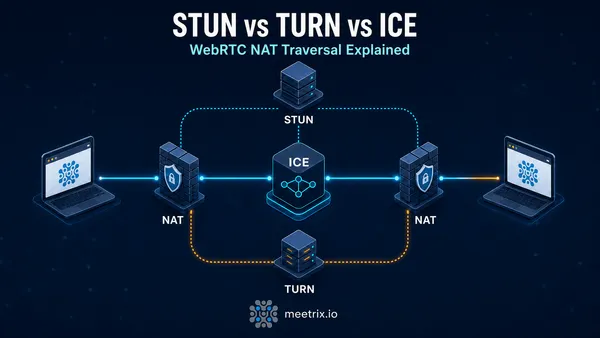
Fix: open the UDP range and confirm LiveKit advertises its public IP. For locked-down networks you need TURN on port 443. Our STUN vs TURN vs ICE explainer covers why, and the coturn developer guide walks through running a dedicated TURN server.
A tool worth knowing: testmatrix, a Matrix server sanity checker that the Element Call docs link to. It includes MatrixRTC checks, and it catches most of the configuration mistakes above faster than reading logs.
LiveKit ships its own TURN server, which covers most setups. If your users sit behind strict enterprise firewalls, a separate TURN server on its own IP and port 443 is often more reliable. Meetrix publishes a ready-to-run coturn image for exactly that case.
Frequently Asked Questions
Why does Element X say "Call is not supported" on my server?
Your homeserver isn't advertising a MatrixRTC transport. Since Element Call v0.24.0 (August 2026), clients only look at the homeserver's /rtc/transports endpoint. Enable msc4143_enabled and add a matrix_rtc.transports block to homeserver.yaml.
Is the rtc_foci entry in .well-known/matrix/client still needed?
Not for current Element Call. It stopped reading rtc_foci in v0.24.0. Keeping it does no harm for older clients, but it won't fix anything on its own. .well-known still matters for m.homeserver, which lk-jwt-service uses.
Can I still use Element's hosted call backend?
No. Element stopped offering its free MatrixRTC backend to self-hosted servers in April 2025. Each homeserver now needs its own LiveKit SFU and MatrixRTC Authorization Service, or a managed Element hosting plan.
Why won't lk-jwt-service start after I upgraded it?
Since v0.5.0 (June 2026) LIVEKIT_FULL_ACCESS_HOMESERVERS is required and there is no wildcard default. Set it to your homeserver's server name. LIVEKIT_LOCAL_HOMESERVERS was removed in the same release.
Should I switch lk-jwt-service to application service mode?
Not yet. The lk-jwt-service maintainers still call it experimental, and Element Call v0.26 still requests tokens through livekit_service_url. Add the new url field in Synapse 1.161 and keep livekit_service_url alongside it.
Does Element Call work with federation disabled?
It can, but lk-jwt-service validates OpenID tokens against your homeserver, so Synapse needs a federation or openid listener reachable by the service. Turning off federation without an openid listener breaks token requests.
Why do participants stay stuck in a call after leaving?
Usually delayed events aren't working. Check max_event_delay_duration in homeserver.yaml, and since lk-jwt-service v0.6.0 point LiveKit's webhook at the service's /sfu_webhook endpoint so it can post the leave event for dropped clients.
Want Matrix Calls Without the Moving Parts?
We design, deploy, and support self-hosted LiveKit, TURN, and video infrastructure in your own cloud account, including sizing, upgrades, and troubleshooting.
Talk to Our WebRTC Engineers