Building a Jitsi cluster by hand works exactly once. The second time, for staging or a new region, you find out which of the forty steps nobody wrote down. Terraform fixes that by describing the whole AWS side of the deployment as code: apply it, and the same cluster comes up every time.
This is how we lay out Terraform for Jitsi Meet with autoscaling videobridges (JVB) and Jibri recorders. We sell the finished scripts, but the structure below is useful whether you buy them or write your own.
What Terraform does for a Jitsi deployment
Terraform is HashiCorp's infrastructure as code tool. You declare resources in HCL files, Terraform works out what has to be created or changed, shows you the plan, and applies it. It keeps a state file so the next run knows what already exists.
For Jitsi, that means:
- You see every change before it happens with
terraform plan, instead of finding out after you clicked the wrong thing in the console. - Staging is the same code with different variables.
- Growing from 250 to 1,000 users is a code change and one apply, not a rebuild.
What the scripts build
| Part | AWS resources | Scales? |
|---|---|---|
| Network | VPC, public subnets, security groups for TCP 443 and UDP 10000 | No |
| Meet server | One EC2 instance with nginx, Prosody and Jicofo, an Elastic IP, DNS record | No, sized once |
| Videobridges | Launch template + Auto Scaling group | Yes |
| Jibri pool | Launch template + Auto Scaling group, S3 bucket for recordings | Yes |
| Multi shard | Several Meet servers behind HAProxy | Shards added in code |
| Access | IAM roles for S3 uploads and CloudWatch metrics | No |
Split it into modules along those lines: network, meet, jvb, jibri. Then each deployment is a short root file that sets sizes and domain names.
module "jvb" {
  source        = "./modules/jvb"
  ami_id        = var.jvb_ami
  instance_type = "c6i.xlarge"
  min_size      = 1
  max_size      = 6
  shard_domain  = module.meet.xmpp_domain
  subnet_ids    = module.network.public_subnet_ids
}
JVB autoscaling
A new videobridge is only useful once Jicofo knows about it. Each bridge logs in to Prosody and joins the bridge "brewery" room; Jicofo watches that room and starts sending conferences to any bridge that appears. So the launch template has one job: boot a server that already has Jitsi Videobridge installed, with the shard's XMPP address and password filled in.
Two ways to get there:
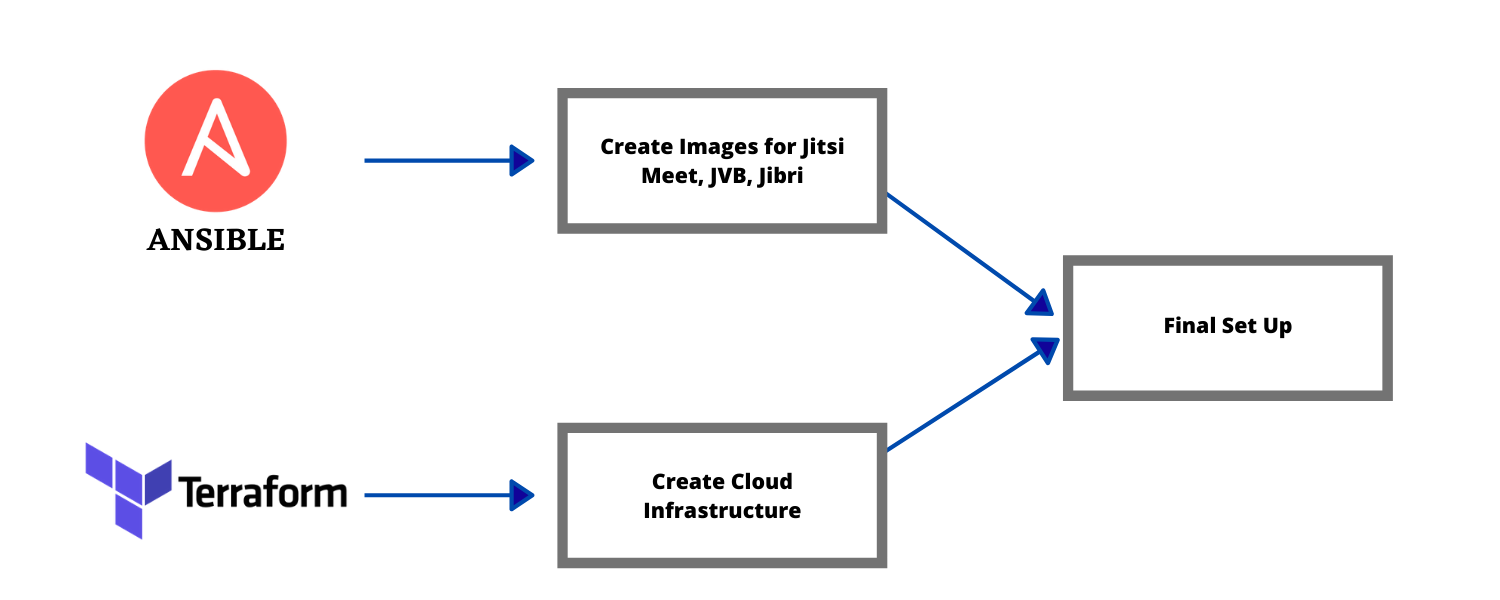
- Baked image: build an AMI with the bridge installed (Packer, or Ansible against a temporary instance), and pass only the shard details through user data. Boots in about a minute. This is what we use.
- Install at boot: user data runs the apt install on a plain Ubuntu image. Simpler, but a slow or failed package mirror now breaks your scaling during your busiest hour.
Scaling on CPU works as a start, but bridges are usually network-bound, and CPU lags behind real load. Publishing the bridge's own stress_level or participant count as a CloudWatch metric gives better signals; our guide to monitoring Jitsi Videobridge with CloudWatch shows how.
Scale-in is where calls drop
Jibri autoscaling
Jibri scales differently from bridges, because one Jibri records one meeting. Ten meetings recording at once need ten idle Jibri instances waiting. So the target is not CPU at all, it is "how many Jibris are free right now". Each Jibri reports whether it is busy; count the idle ones and keep that number above a small buffer, such as two.
Recordings should leave the instance as soon as they finish. Give the Jibri instance role write access to one S3 bucket and upload from Jibri's finalize script, so a scale-in never deletes an unsaved file.
Occasional large meetings at a low cost
The most common question we get about this setup, nearly word for word: "I need Jitsi for occasional large meetings. How do I make it autoscale when participants spike and stay cheap the rest of the time?"
- Keep the always-on part small. The Meet server doesn't carry media, so a modest instance handles a lot of signalling.
- Minimum of one bridge. Enough for everyday calls. Everything above that is scaled capacity you only pay for while it runs.
- Pre-scale for known events. Autoscaling reacts in minutes; a 500-person all-hands arrives in seconds. A scheduled action that raises the minimum an hour before the event is cheap insurance.
- Turn it off at night. If nobody meets outside office hours, a scheduled shutdown saves more than any instance tuning. See cutting Jitsi costs with scheduled shutdown.
Before a big event, raise your EC2 vCPU quota; new AWS accounts often can't launch more than a handful of instances. Here is how to request more.
Ready-made Jitsi Terraform scripts
Writing and testing all of this takes weeks, mostly spent on the scale-in and registration edge cases. Our Jitsi infrastructure as code scripts cover single-shard setups from 50 to 500 users and auto-scaling multi-shard clusters from 1,000 to 2,000, with or without Jibri recording, for your own AWS account. If you would rather not run Terraform at all, we can host and set up Jitsi on AWS for you, and the benefits of Ansible automation explains where configuration management fits alongside Terraform.
Frequently Asked Questions
What do Jitsi Meet Terraform scripts create?
The whole AWS side of a Jitsi deployment: the network, security groups, the Meet server with Prosody and Jicofo, launch templates and Auto Scaling groups for videobridges, and optionally a Jibri pool for recording, plus DNS and IAM roles.
How do I make Jitsi autoscale for occasional large meetings but stay cheap?
Keep the Meet server small and always on, put the videobridges in an Auto Scaling group with a minimum of one, and scale on bridge load rather than CPU alone. Scale Jibri the same way, and schedule extra capacity before known big events.
Should I use Terraform or Ansible for Jitsi?
Both, for different parts. Terraform builds the AWS resources and keeps track of them. Ansible or a baked machine image configures the Jitsi software on each server. Auto-scaled bridges should boot from an image so they are ready without a playbook run.
Can Terraform deploy Jitsi on Google Cloud or Azure?
Terraform itself can, with the Google or Azure provider, but the resources and scaling features are different, so AWS code does not carry over. Meetrix's ready-made Jitsi Terraform scripts are for AWS only.
What is JVB automation?
Starting, configuring and removing Jitsi Videobridge servers without manual work: new bridges boot from a template, register with Jicofo, take traffic, and are drained and terminated when demand drops.