Ansible is what you reach for when "SSH in and run these twelve commands" has happened one time too many. It takes the steps you would type by hand, writes them down as a playbook, and runs them against one server or five hundred.
We use it for the boring, repeated parts of running video infrastructure: installing Jitsi components, pushing config changes to every videobridge, rotating certificates. Here is what it really buys you, and where it stops being the right tool.
Benefits of Ansible automation
No agent on the servers
Ansible connects over plain SSH. There is no daemon to install, patch or monitor on each machine, and nothing running between jobs. For a fleet of short-lived servers, such as videobridges that an auto scaling group starts and stops all day, that matters. There is simply nothing to bootstrap.
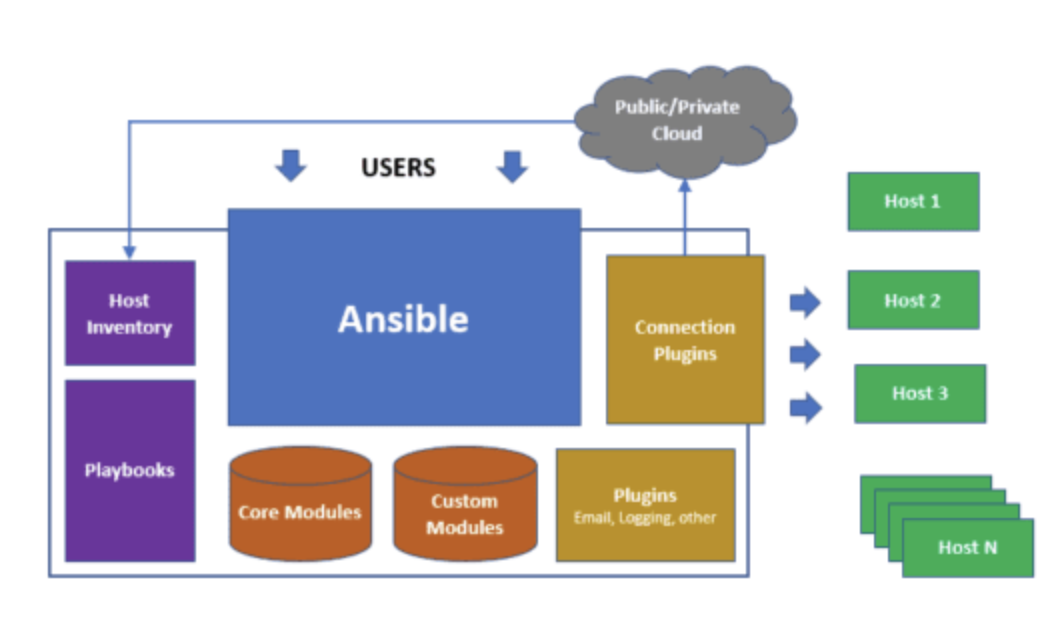
The moving parts are few: an inventory of hosts, playbooks that say what to do, modules that do it, and connection plugins that reach the servers or the cloud APIs.
Playbooks you can read
A playbook is YAML. Someone who has never used Ansible can usually tell what it does:
- hosts: videobridges
  become: true
  tasks:
    - name: Install Jitsi Videobridge
      ansible.builtin.apt:
        name: jitsi-videobridge2
        state: present
        update_cache: true

    - name: Push the bridge config
      ansible.builtin.template:
        src: jvb.conf.j2
        dest: /etc/jitsi/videobridge/jvb.conf
      notify: restart jvb

  handlers:
    - name: restart jvb
      ansible.builtin.service:
        name: jitsi-videobridge2
        state: restarted
Safe to run again
Most Ansible modules are idempotent: they describe the end state, not the steps. Run the playbook above twice and the second run changes nothing, because the package is already installed and the file already matches. The service only restarts when the config really changed. This is the single biggest win over shell scripts, which happily append the same line to a file every time they run.
Same result on every server
Hand-configured servers drift. Someone fixes one bridge at 2am and forgets the other four. With the config in a playbook, and the playbook in Git, every server gets the same settings, and a new one is identical to the old ones from the first minute.
Three kinds of work in one tool
- Provisioning: preparing fresh servers with users, packages, firewall rules and kernel settings.
- Configuration management: changing config files, starting and stopping services, applying security policies.
- Application deployment: shipping your own software to production, in order, one batch of servers at a time.
Ansible Automation Platform benefits
Open source Ansible is a command-line tool. Red Hat Ansible Automation Platform is the paid product around it, and what it adds is mostly about teams, not features:
- A web UI and API to run playbooks, so people don't need shell access to a control machine
- Role-based access: who can run which job against which servers
- A credential store, so SSH keys and cloud secrets are not scattered across laptops
- Schedules, job history and audit logs
- Certified content collections and Red Hat support
Our view: a small team with one person running playbooks does not need it. Once several teams run automation against production and someone asks "who changed this and when", it starts paying for itself. The free AWX project is the upstream of its controller, if you want to try the web UI first.
Ansible or Terraform?
Both show up in every "infrastructure as code" conversation, but they solve different problems.
| Terraform | Ansible | |
|---|---|---|
| Main job | Create cloud resources: VPCs, instances, load balancers, DNS | Configure what runs on the servers |
| Keeps state | Yes, in a state file | No, it checks the server each run |
| Deletes things | Yes, when removed from code | Only if you write a task for it |
| Language | HCL | YAML |
The pattern that works: Terraform builds the servers, Ansible sets them up. Our Jitsi Meet Terraform scripts for JVB and Jibri autoscaling follow that split. For auto scaling groups, where servers appear without anyone running a playbook, bake the Ansible result into the machine image instead, so a new instance boots ready.
Start with one painful task
Where this fits for Jitsi
A Jitsi deployment has several moving parts (Prosody, Jicofo, the videobridges, Jibri) that all need matching config. That is exactly the kind of setup Ansible keeps consistent. If you are working out how the parts fit together first, start with Jitsi architecture, then auto scaling Jitsi on AWS. And if you would rather have someone else own the automation, that is part of our commercial support for Jitsi.
Frequently Asked Questions
What is Ansible used for?
Configuring servers and deploying software over SSH: installing packages, writing config files, restarting services and rolling out application updates across many machines at once, the same way every time.
What are the main benefits of Ansible?
No agent to install on the servers, playbooks written in readable YAML, idempotent runs that are safe to repeat, and a large collection of ready modules for Linux, Windows, network devices and every major cloud.
What does Ansible Automation Platform add?
Ansible Automation Platform is Red Hat's paid product around open source Ansible. It adds a web UI and API for running jobs, role-based access, credential storage, scheduling, audit logs and certified content, plus Red Hat support.
Is Ansible better than Terraform?
They do different jobs. Terraform creates cloud resources and tracks them in state. Ansible configures what runs on those resources. Many teams use Terraform to build the servers and Ansible to set them up.
Does Ansible need an agent on each server?
No. Ansible connects over SSH, or WinRM for Windows, and needs only Python on Linux targets. Nothing keeps running on the server between runs.