On this page
The usual reason to want LDAP on Jitsi Meet is simple: people already have a directory password, and nobody wants a second list of Jitsi accounts to maintain. With LDAP in place, anyone in your OpenLDAP or Active Directory can start a meeting with the credentials they already use, and anyone who leaves the company loses access the moment their directory account is disabled.
This guide combines what used to be two separate articles on our old blog, one for LDAP through Cyrus SASL and one for Active Directory, and brings the steps up to date with the current Jitsi handbook. The older Active Directory method, built on lualdap compiled with luarocks against OpenSSL 1.0 headers, no longer builds cleanly on current Ubuntu. Don't use it.
The LDAP authentication process in Jitsi Meet
Jitsi Meet never talks to LDAP directly. When a host enters a username and password, the browser sends them to Prosody, the XMPP server. Prosody hands them to Cyrus SASL (through the mod_auth_cyrus module), Cyrus asks the saslauthd daemon, and saslauthd binds to your directory. A successful bind means a successful login.
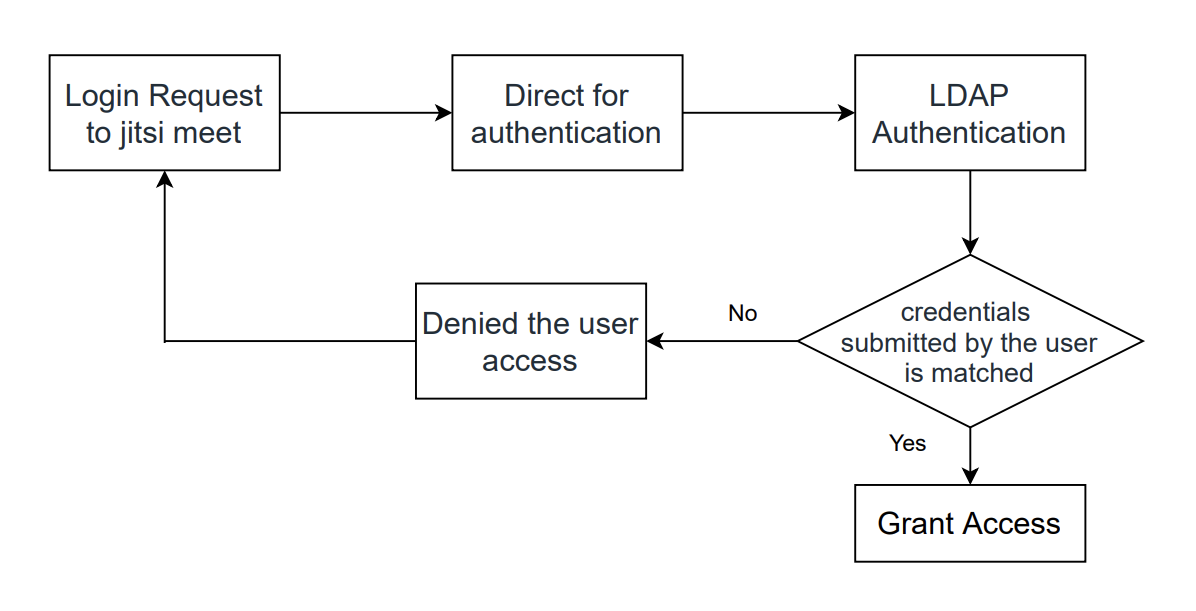
That chain matters for debugging. When a login fails, it failed at one of those hops, and each hop has its own log and its own test command. The rest of this guide sets them up in order and tests each one before moving on.
LDAP or single sign-on?
Step 1: Hosts log in, guests don't
Most teams want authenticated users to create meetings and everyone else to join them without an account. That needs a guest domain. The paths below assume a Debian or Ubuntu package install (see installing Jitsi Meet on Ubuntu if you are starting from scratch). Replace meet.example.com with your hostname throughout.
In /etc/prosody/conf.avail/meet.example.com.cfg.lua, add a guest VirtualHost after the main one:
VirtualHost "guest.meet.example.com"
    authentication = "jitsi-anonymous"
    c2s_require_encryption = false
The guest domain is internal to Prosody. It needs no DNS record and no certificate.
In /etc/jitsi/meet/meet.example.com-config.js, tell the web app about it:
var config = {
    hosts: {
        domain: 'meet.example.com',
        anonymousdomain: 'guest.meet.example.com',
        // ...
    },
    // ...
};
And in /etc/jitsi/jicofo/jicofo.conf, turn on authentication so Jicofo only lets logged-in users create rooms:
jicofo {
  authentication: {
    enabled: true
    type: XMPP
    login-url: meet.example.com
  }
  // ...
}
Step 2: Prosody LDAP through saslauthd
Install the SASL daemon, its LDAP module, the Lua bindings Prosody uses, and the Prosody community modules:
sudo apt install -y sasl2-bin libsasl2-modules-ldap lua-cyrussasl prosody-modules
sudo prosodyctl install --server=https://modules.prosody.im/rocks/ mod_auth_cyrus
Create /etc/saslauthd.conf. This example is for OpenLDAP:
ldap_servers: ldaps://ldap.example.com
ldap_bind_dn: cn=jitsi-reader,ou=services,dc=example,dc=com
ldap_bind_pw: REPLACE_WITH_SERVICE_ACCOUNT_PASSWORD
ldap_auth_method: bind
ldap_search_base: ou=people,dc=example,dc=com
ldap_filter: (uid=%U)
ldap_version: 3
The bind account only needs read access to find users. Use a dedicated service account, not a domain admin, and make the file readable by root only, because it holds that password:
sudo chmod 600 /etc/saslauthd.confActive Directory LDAP authentication settings
Active Directory needs three changes: the sAMAccountName attribute, a bind account in user@domain form, and LDAPS on port 636 so AD authentication never sends passwords in clear text (the Cyrus SASL documentation lists every ldap_ option if you need more):
ldap_servers: ldaps://dc01.corp.example.com
ldap_bind_dn: svc-jitsi@corp.example.com
ldap_bind_pw: REPLACE_WITH_SERVICE_ACCOUNT_PASSWORD
ldap_auth_method: bind
ldap_search_base: dc=corp,dc=example,dc=com
ldap_filter: (sAMAccountName=%U)
ldap_version: 3
ldap_tls_check_peer: yes
ldap_tls_cacert_file: /etc/ssl/certs/ca-certificates.crt
Two details trip people up here. %U is the username without any realm, while %u can include one, and sAMAccountName never contains a realm. And for ldap_tls_check_peer to succeed, your domain's root CA has to be in the system trust store. Copy it into /usr/local/share/ca-certificates/ and run sudo update-ca-certificates.
To let only one group create meetings, tighten the filter:
ldap_filter: (&(sAMAccountName=%U)(memberOf=CN=Jitsi Hosts,OU=Groups,DC=corp,DC=example,DC=com))Start and test saslauthd
Enable the LDAP mechanism in /etc/default/saslauthd:
sudo sed -i -e "s/^START=.*/START=yes/" -e "s/^MECHANISMS=.*/MECHANISMS=\"ldap\"/" /etc/default/saslauthd
sudo systemctl enable --now saslauthd
sudo systemctl restart saslauthd
Now test the directory hop on its own, before Prosody is involved:
sudo testsaslauthd -u alice -p 'alice-password' -s xmpp0: OK "Success." means saslauthd can find the user and bind as them. Do not continue until you see it. A failure here is an LDAP problem (filter, bind account, TLS), and no Prosody setting will fix it. Watch /var/log/auth.log while you retry.
Step 3: Switch Prosody to Cyrus
Tell Cyrus SASL to use saslauthd for Prosody by creating /etc/sasl/prosody.conf:
sudo mkdir -p /etc/sasl
printf 'pwcheck_method: saslauthd
mech_list: PLAIN
' | sudo tee /etc/sasl/prosody.conf
Let Prosody talk to the saslauthd socket by adding it to the sasl group:
sudo adduser prosody saslOlder guides, including ours, told you to chmod 777 /var/run/saslauthd/ instead. That lets every local user on the box query your directory through the socket. Group membership does the same job properly.
Finally, change the main VirtualHost in /etc/prosody/conf.avail/meet.example.com.cfg.lua from anonymous to Cyrus:
VirtualHost "meet.example.com"
    authentication = "cyrus"
    allow_unencrypted_plain_auth = true
    -- keep the existing ssl and modules_enabled settings below
allow_unencrypted_plain_auth sounds alarming, but PLAIN is the only mechanism saslauthd can verify, and the browser's connection is already encrypted by nginx before it reaches Prosody. Restart everything:
sudo systemctl restart prosody jicofo jitsi-videobridge2Open a new room. You should see a Waiting for the host prompt with an I am the host button. Log in with a directory account and the meeting starts; guests who arrive later go straight in.
When logins still fail
| Symptom | Likely cause |
|---|---|
testsaslauthd fails | LDAP side: wrong filter, bind account, or untrusted certificate. Check /var/log/auth.log. |
testsaslauthd works, Jitsi login fails | Prosody cannot reach the socket (restart Prosody after adduser), mod_auth_cyrus not installed, or /etc/sasl/prosody.conf missing. |
| No login prompt at all, anyone creates rooms | Jicofo authentication not enabled, or Jicofo not restarted. |
| Logged-in host is asked to log in again | login-url in jicofo.conf does not match the main domain. |
| Guests get "disconnected" | Typo in anonymousdomain or the guest VirtualHost name. See Jitsi Meet common errors. |
Once logins work, look at the rest of the attack surface. Authentication only controls who creates rooms; lobby, room passwords and open ports are covered in Jitsi Meet security best practices.
Frequently Asked Questions
Does Jitsi Meet support LDAP authentication?
Yes, through Prosody. Prosody checks usernames and passwords with Cyrus SASL, and saslauthd performs the bind against your LDAP server. Jitsi Meet itself only shows the login prompt; nothing in the web app needs to know LDAP is involved.
Can Jitsi Meet authenticate against Microsoft Active Directory?
Yes. Active Directory speaks LDAP, so the same saslauthd setup works. Use a filter on sAMAccountName, bind with a service account, and connect over ldaps on port 636 so passwords are not sent to the domain controller in clear text.
Do guests need an LDAP account to join a meeting?
No. With a guest domain configured, only the person who creates a room has to log in. Everyone else joins anonymously once the room exists. Remove the guest domain if every participant must authenticate.
Can I allow only one Active Directory group to create meetings?
Yes. Add a memberOf condition to ldap_filter in /etc/saslauthd.conf, for example (&(sAMAccountName=%U)(memberOf=CN=Jitsi Hosts,OU=Groups,DC=example,DC=com)). Users outside that group fail the bind search and cannot log in.
Should I use LDAP or JWT for Jitsi authentication?
LDAP is the quickest way to reuse existing directory passwords. JWT is what the Jitsi handbook recommends for new installs, and it is the path to single sign-on: an identity provider such as Keycloak federates your directory and issues tokens instead.
Can Prosody use LDAP without saslauthd?
Yes. The community mod_auth_ldap module binds to the directory from Prosody itself. This guide follows the Jitsi handbook's Cyrus and saslauthd route instead, because testsaslauthd lets you prove the LDAP side works before Prosody is involved.
How does the Active Directory authentication process work in Jitsi?
The host types a username and password, Prosody passes them to Cyrus SASL, saslauthd searches Active Directory with a service account, then binds as that user. A successful bind lets Jicofo open the room; guests then join through the anonymous guest domain.
Self-Hosted Jitsi Meet, Ready for Your Directory
A pre-configured Jitsi Meet deployment on AWS, so you start from a working Prosody and Jicofo setup and only add the LDAP pieces.
Get Jitsi Meet on AWS Marketplace