On this page
Our old blog split this setup into three articles: one for Okta, one for Jitsi's JWT and guest settings, and one for the middleware. You needed all three open in tabs to get anywhere. This guide puts the whole thing on one page and updates the parts that have changed since 2023, most importantly how Jitsi's token authentication is configured.
The goal: people in your organization click "I am the host", sign in with their Okta account, and the meeting starts. Guests join without any account.
How Jitsi SSO works with Okta
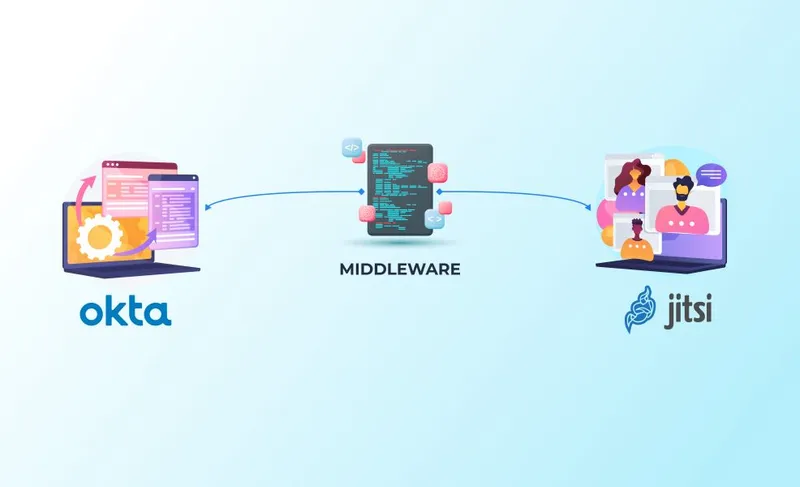
Jitsi Meet has no SAML support, and it doesn't need any. It trusts signed JSON Web Tokens. So the job is to turn an Okta SAML login into a JWT that Jitsi accepts, and a small middleware does exactly that:
- A host opens a meeting on
meet.example.comand clicks to log in. - Jitsi sends the browser to the middleware at
sso.example.com, with the room name in the URL. - The middleware, a Shibboleth service provider, sends the browser to Okta.
- The user signs in to Okta, which posts a SAML assertion back to the middleware.
- The middleware creates a JWT signed with the secret Jitsi knows, and redirects the browser back to the room with the token.
- Prosody validates the token, and the host is in.
The middleware in this guide is Jitsi-SAML2JWT by Renater, the French research and education network. It is open source, still maintained, and runs in Docker. You will need three names: meet.example.com for Jitsi, sso.example.com for the middleware on its own server, and your Okta organization.
SAML or OIDC?
Jitsi OAuth2 and OIDC options
Jitsi has no OAuth2 or OpenID Connect support of its own either, so those routes have the same shape: an adapter finishes the login with your provider and issues the JWT. Which protocol you use is decided by that provider, not by Jitsi. Okta speaks both, and SAML is the choice here because Jitsi-SAML2JWT is maintained and has the fewest moving parts. Starting from Keycloak, Authentik or another OIDC-first provider, take the OIDC route instead.
Step 1: Turn on token auth for Jitsi Meet SSO
Start from a working Jitsi Meet install (see installing Jitsi Meet on Ubuntu). Install the token package:
sudo apt install -y jitsi-meet-tokensIt asks for an application ID and an application secret. Pick an ID such as jitsi-okta and generate a long secret with openssl rand -hex 32. Write both down; the middleware needs them in step 3. The package switches Prosody to token authentication for you. Open /etc/prosody/conf.avail/meet.example.com.cfg.lua and check the main VirtualHost looks like this:
VirtualHost "meet.example.com"
    authentication = "token"
    app_id = "jitsi-okta"
    app_secret = "YOUR_LONG_SECRET"
    allow_empty_token = true
allow_empty_token = true is what lets guests in without a token. Add the guest domain after it:
VirtualHost "guest.meet.example.com"
    authentication = "jitsi-anonymous"
    c2s_require_encryption = false
In /etc/jitsi/meet/meet.example.com-config.js, set the guest domain and point the login button at the middleware:
var config = {
    hosts: {
        domain: 'meet.example.com',
        anonymousdomain: 'guest.meet.example.com',
        // ...
    },
    tokenAuthUrl: 'https://sso.example.com/redirectWithToken?room={room}',
    // ...
};
Jitsi replaces {room} with the meeting name, so the user returns to the right room after signing in.
Changed since the old guide
jicofo.conf. The current Jitsi handbook says the opposite: Jicofo authentication must be disabled when token authentication is active, because Prosody enforces the token. If you followed the old guide, remove the authentication block from jicofo.conf. The handbook's token authentication page also lists the Prosody modules that make guests wait for a host, if you configure them by hand.
sudo systemctl restart prosody jicofo jitsi-videobridge2Step 2: The Okta SAML app
In the Okta Admin Console (Okta's SAML app setup guide documents the same screens, if one of these fields has moved since):
- Go to Applications, then Create App Integration, and choose SAML 2.0.
- Name it, for example "Jitsi Meet", and click Next.
- Set Single sign-on URL to
https://sso.example.com/Shibboleth.sso/SAML2/POST. - Set Audience URI (SP Entity ID) to a unique identifier, for example
https://sso.example.com/shibboleth. You reuse this exact string in step 3. - Under Attribute Statements, add
urn:mace:dir:attribute-def:mailmapped touser.emailandurn:mace:dir:attribute-def:displayNamemapped touser.firstName(or a full-name expression). - Finish. On the app's Sign On tab, copy the Metadata URL and note the Okta issuer / entity ID shown in the IdP metadata.
- On Assignments, assign the people or groups allowed to host meetings.
That last step doubles as access control. Anyone not assigned to the app never gets a token, so it is the simplest place to limit hosting to one department.
Step 3: The SAML-to-JWT middleware
On a separate server with Docker installed, and with sso.example.com pointing at it:
git clone https://github.com/Renater/Jitsi-SAML2JWT.git
cd Jitsi-SAML2JWT
cp .env_ref .env
Edit .env. The reference file documents every variable; these are the ones this setup depends on:
| Variable | Set it to |
|---|---|
SHIBBOLETH_TEMPLATE_XML | The direct-IdP template, since you have one identity provider |
SP_ENTITY_ID | The Audience URI from Okta, exactly |
METADATA_URL | The Okta metadata URL |
SSO_URL | The Okta IdP entity ID from the metadata |
JITSI_DOMAIN | meet.example.com, the Prosody VirtualHost |
JWT_APP_ID | The application ID from step 1 |
JWT_GENERATOR_KEY | The application secret from step 1 |
JWT_TOKEN_MODE | default (email-based identity) |
SERVER_NAME | sso.example.com |
Generate the certificates the service provider needs, then build and start it:
cd tools
bash init_certificates.sh
cd ..
docker image build -t jitsisaml2jwt .
docker compose up -d
The self-signed certificate is fine for signing SAML messages. For the HTTPS site users actually visit, put a trusted certificate in place, or run it behind a reverse proxy with Let's Encrypt, so people don't see a browser warning halfway through signing in.
Step 4: Test the whole flow
- Open
https://meet.example.com/okta-testin a private browser window. - Click I am the host (or the login button).
- You should land on Okta, sign in, and return to
okta-testwith the meeting started. - Join the same room from another browser without logging in. That participant should get in as a guest.
If step 3 bounces you around without returning, the problem is between the middleware and Okta. If you return to the room but Jitsi still asks you to log in, the problem is between the middleware and Prosody. That split halves the debugging.
When it doesn't work
| Symptom | Check |
|---|---|
| Okta shows an error about the app or audience | SP_ENTITY_ID must match the Audience URI character for character, including the trailing path. |
| Okta says you are not assigned | Assign the user or their group to the Jitsi SAML app. |
| Back in Jitsi, still asked to log in | JWT_APP_ID and JWT_GENERATOR_KEY versus Prosody's app_id and app_secret, and JITSI_DOMAIN versus the VirtualHost. Read /var/log/prosody/prosody.log for the token error. |
| Token rejected as expired or not yet valid | Clock drift between servers. Make sure both run time sync (timedatectl should show "System clock synchronized: yes"). |
| Guests cannot join | allow_empty_token = true and the guest VirtualHost and anonymousdomain names. |
Once SSO works, don't stop at authentication. Room creation is only one control; lobby, end-to-end encryption and exposed ports are covered in Jitsi Meet security best practices. And if you want to understand exactly what goes into the token, JWT integration with Jitsi and creating a JWT token explain the claims.
Frequently Asked Questions
Does Jitsi Meet support SSO natively?
Not directly. Jitsi Meet authenticates with JWT tokens, and it does not speak SAML or OIDC itself. Single sign-on works by putting a small service in between that logs the user in with your identity provider and hands Jitsi a signed JWT.
Can I use Okta with Jitsi Meet through OIDC instead of SAML?
Yes, with a different middleware. OIDC adapters that turn an OpenID Connect login into a Jitsi JWT exist, and the Keycloak route in our Keycloak SSO guide follows that pattern. This guide uses SAML because Jitsi-SAML2JWT is maintained and fits organizations that already manage SAML apps in Okta.
Do guests need an Okta account to join meetings?
No, as long as allow_empty_token is true and the guest domain is configured. Only the host signs in through Okta; guests join once the meeting has started. Set allow_empty_token to false if every participant must authenticate.
Why does Jitsi reject the token after a successful Okta login?
Usually a mismatch: the app ID or secret in the middleware differs from Prosody's app_id and app_secret, the token was issued for a different domain than the Prosody VirtualHost, or the clocks on the two servers disagree enough that the token looks expired or not yet valid.
Can I restrict Jitsi access to one Okta group?
Yes, and the right place is Okta. Assign the Jitsi SAML app only to that group under Assignments. Users outside it never get a SAML assertion, so they never receive a token.
What is Jitsi SSO?
Jitsi SSO means hosts sign in with your company identity provider instead of a separate Jitsi account. Jitsi itself only checks a signed JWT, so a middleware handles the SAML or OIDC login and hands Jitsi the token.
Does Jitsi support OAuth2?
Not on its own. Jitsi accepts JWTs, so OAuth2 and OIDC logins need an adapter that finishes the login with your provider and issues a token Prosody trusts. The setup matches the SAML flow here, with different middleware.
Need SSO on Jitsi Without the Trial and Error?
We set up Jitsi Meet authentication with Okta, Azure AD, Keycloak and other identity providers for teams that need it working the first time.
Talk to Meetrix About Jitsi Support