On this page
Jitsi Meet error messages are short and the causes behind them are not. "You have been disconnected" can mean Prosody crashed, nginx is not proxying WebSockets, or the hostname in one config file disagrees with another. The message on screen tells you which component gave up, not why.
This is the list of errors that actually show up on self-hosted installs, in roughly the order you meet them: right after install, when the first meeting starts, and when the first real group call happens. Each one gets the check that tells you the cause and the change that fixes it.
Read the right log first
Every section below starts from a log, so here is where they live on a Debian or Ubuntu package install:
| Component | Log | Look here when |
|---|---|---|
| nginx | /var/log/nginx/error.log | The page does not load at all |
| Prosody | /var/log/prosody/prosody.log | You get "disconnected" or cannot join |
| Jicofo | /var/log/jitsi/jicofo.log | The meeting starts and immediately fails |
| Videobridge | /var/log/jitsi/jvb.log | Audio and video never arrive, or group calls break |
And one command that answers "is everything even running?" before you open any of them:
sudo systemctl status nginx prosody jicofo jitsi-videobridge2 --no-pagerJitsi connection error: ERR_CONNECTION_REFUSED after install
The install finished, you open https://meet.example.com, and the browser says the connection was refused. That is the most searched Jitsi error we see, usually on fresh Debian installs, and it means nothing answered on port 443.
Three causes cover almost every case. First, check whether anything is listening:
sudo ss -tlnp | grep -E ':(80|443)\b'
sudo nginx -t- Something else owns 443. Apache from an earlier install, or a TURN server configured to listen on 443, stops nginx from binding.
ssshows the process name. Stop or move the other service, thensudo systemctl restart nginx. - nginx refused its own config. If
nginx -treports an error, fix that line first. Upgrades that leave a duplicate listener behind in/etc/nginx/modules-enabled/60-jitsi-meet.confhave caused this before. - The firewall never opened the port. On AWS, GCP or Azure, the cloud security group is a separate firewall from
ufw, and new instances often allow only 22. Open 80 and 443 TCP and UDP 10000 in both places. The full Jitsi port list explains which of the rest you actually need.
A related trap: if you picked Let's Encrypt during install and port 80 was closed, the certificate request failed and nginx may be pointing at files that don't exist. Open port 80 and rerun sudo /usr/share/jitsi-meet/scripts/install-letsencrypt-cert.sh. If the install itself went sideways, installing Jitsi Meet on Ubuntu 22.04, 24.04 and 26.04 lists the order that avoids both problems (the Debian steps are the same).
Jitsi "You have been disconnected"
The page loads, you type a room name, and a few seconds later the meeting shows "You have been disconnected" with a reconnect countdown. The web app is fine. Its XMPP connection to Prosody is not.
Open the browser's developer console before anything else. A failed request to /xmpp-websocket or /http-bind tells you the break is in nginx or Prosody, and the status code tells you which:
- 404 or 502 on those paths: nginx is not proxying them to Prosody on port 5280. This happens after hand-editing the site config or putting another reverse proxy in front without WebSocket upgrade headers.
- Connection opens, then closes: Prosody accepted the connection but rejected the domain. Check that
hosts.domainin/etc/jitsi/meet/meet.example.com-config.jsmatches theVirtualHostin/etc/prosody/conf.d/meet.example.com.cfg.luaexactly. - No request at all: the page loaded a cached config from before an upgrade or domain change. Hard-refresh, and if users keep hitting it, see fixing Jitsi cache issues after upgrades.
You can test Prosody's HTTP side directly from the server. A healthy BOSH endpoint answers a plain GET with a short "It works" page:
curl -s https://meet.example.com/http-bind
sudo tail -n 50 /var/log/prosody/prosody.log
If that curl hangs or errors, the problem is in front of Prosody. If it returns the page but meetings still disconnect, read the Prosody log while you reproduce it. Authentication changes are the usual culprit, particularly after switching a server to JWT or LDAP authentication.
Jitsi "Unfortunately, something went wrong"
This one is different. It is the web app itself crashing, not a lost connection, and the browser console will show a JavaScript error rather than a failed network request.
On self-hosted servers it almost always follows an edit to config.js or interface_config.js. A missing comma or an unclosed brace in either file stops the app from starting. Validate the file before you blame anything else:
node --check /etc/jitsi/meet/meet.example.com-config.jsIf the syntax is fine, compare your file against the current upstream config.js. Options get renamed between releases, and a config copied from an old server can carry values the new front end no longer understands.
Calls drop when a third person joins
Two people talk happily. A third joins and video freezes for everyone, or the client shows conference.videobridgeNotAvailable. This pattern is so specific it almost diagnoses itself.
With two participants Jitsi uses a direct peer-to-peer connection and the videobridge is not involved. The third participant moves the call onto the bridge, so anything wrong with the bridge only appears then. There are two different failures hiding behind the same symptom.
conference.videobridgeNotAvailable: Jicofo has no bridge
If the client shows conference.videobridgeNotAvailable, Jicofo could not find a bridge at all. jicofo.log will report that no bridge is available. Check that the bridge is running and that it joined the brewery room:
sudo systemctl status jitsi-videobridge2 --no-pager
grep -i brewery /etc/jitsi/jicofo/jicofo.conf
grep -i muc_jids /etc/jitsi/videobridge/jvb.conf
The two JIDs must match character for character. A mismatch there, or a wrong jvb password after a reinstall, is covered in depth in fixing Jicofo configuration errors.
The bridge advertises the wrong address
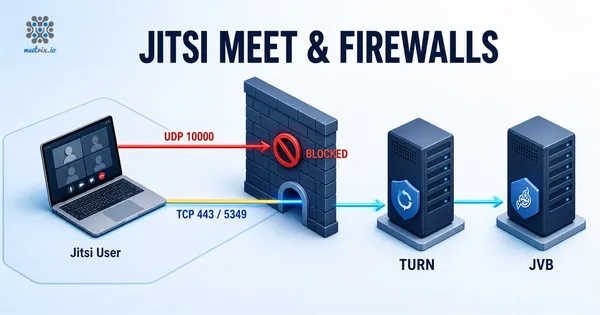
If there is no error but media simply never arrives, the bridge is up and unreachable. Either UDP 10000 is blocked, or the server sits behind NAT (every AWS and GCP instance does) and the bridge is advertising its private IP. The Jitsi handbook fix is a static mapping in /etc/jitsi/videobridge/jvb.conf:
ice4j {
  harvest {
    mapping {
      static-mappings = [
        {
          local-address = "10.0.1.25"
          public-address = "203.0.113.10"
        }
      ]
    }
  }
}
sudo systemctl restart jitsi-videobridge2Use the instance's private IP for local-address and its public or Elastic IP for public-address. If some of your users sit behind firewalls that block UDP entirely, no bridge setting will reach them; they need a TURN server on 443, which Jitsi Meet and firewalls walks through.
Certificate errors between components
Multi-server setups and reinstalls produce Java stack traces like these in jvb.log or jicofo.log:
javax.net.ssl.SSLHandshakeException: sun.security.validator.ValidatorException:
PKIX path validation failed: java.security.cert.CertPathValidatorException
Jicofo and the videobridge connect to Prosody over TLS and do not trust its certificate. On a single-server package install that certificate is self-signed for the auth. domain, and a reinstall regenerates it without updating the system trust store. Regenerate it and trust it again:
sudo prosodyctl cert generate auth.meet.example.com
sudo ln -sf /var/lib/prosody/auth.meet.example.com.crt /usr/local/share/ca-certificates/auth.meet.example.com.crt
sudo update-ca-certificates -f
sudo systemctl restart prosody jicofo jitsi-videobridge2
disable_certificate_verification in jvb.conf
Old guides tell you to add org.jitsi.videobridge.xmpp.user.shard.DISABLE_CERTIFICATE_VERIFICATION=true to sip-communicator.properties. On current builds the videobridge reads jvb.conf, where the equivalent sits on the shard block:
videobridge {
  apis {
    xmpp-client {
      configs {
        shard {
          hostname = "localhost"
          domain = "auth.meet.example.com"
          username = "jvb"
          password = "YOUR_JVB_PASSWORD"
          muc_jids = "JvbBrewery@internal.auth.meet.example.com"
          muc_nickname = "jvb-1"
          disable_certificate_verification = true
        }
      }
    }
  }
}
Treat this as a workaround
disable-certificate-verification in the xmpp.client block of jicofo.conf, with the same caveat.
Jitsi camera not working (or the microphone)
Short section, because the cause is rarely the server. Browsers only expose cameras and microphones on HTTPS pages, so a server still running on a self-signed certificate that a user clicked past can behave oddly on some browsers. After that, check the site permission in the browser's address bar and whether another application (a second meeting tab counts) already holds the device. To rule the hardware in or out, have the user run the mic test and webcam test in the same browser.
If devices work on meet.jit.si but not on your server, it is your certificate or your config.js. If they fail on both, it is the user's machine. The browser side of this, permissions, device IDs and the errors getUserMedia throws, is covered in accessing the camera and mic in WebRTC apps.
For everything else, the pattern holds: find which component gave up, read its log while you reproduce the problem, and change one thing at a time. Most Jitsi outages we see come from two config files disagreeing about a hostname, and the hardening checklist is worth a read once the errors are gone, because several of the same files are involved. If you are stuck on something not listed here, search the Jitsi community forum with the exact log line; most errors have a thread.
Frequently Asked Questions
Why does Jitsi say 'You have been disconnected'?
The browser lost its XMPP connection to Prosody. On a self-hosted server that is nearly always nginx failing on /xmpp-websocket or /http-bind, Prosody being down, or a config.js hostname that doesn't match the Prosody VirtualHost. Check the browser console, then prosody.log.
Why does a Jitsi call work with two people but drop when a third joins?
Two participants talk peer to peer, without the videobridge. The third person moves the call onto the bridge, and if UDP 10000 is blocked or the bridge advertises a private IP behind NAT, media never arrives. Open the port or add a static NAT mapping in jvb.conf.
Where are the Jitsi Meet log files?
On a Debian or Ubuntu package install: /var/log/jitsi/jicofo.log for conference focus, /var/log/jitsi/jvb.log for the videobridge, /var/log/prosody/prosody.log for XMPP, and /var/log/nginx/error.log for the web server. Follow them with tail -f while you reproduce the problem.
Does DISABLE_CERTIFICATE_VERIFICATION in sip-communicator.properties still work?
That is the old properties-file form. Current videobridge builds read /etc/jitsi/videobridge/jvb.conf, where the setting lives on the xmpp-client shard block. Turning verification off is a workaround for self-signed internal certificates; regenerating and trusting the Prosody certificate is the real fix.
What does 'conference.videobridgeNotAvailable' mean?
Jicofo could not find a videobridge to host the conference. Either jitsi-videobridge2 is not running, or it never joined the brewery MUC because its muc_jids value or XMPP credentials do not match what Jicofo expects. jicofo.log will say that no bridge is available.
Why do I get jitsi-meet ERR_CONNECTION_REFUSED after install on Debian?
Nothing is listening on 443, or a firewall blocks it. Usually nginx failed to start because Apache or a TURN server already holds 443, or the cloud security group only allows port 22. Run ss -tlnp to see what owns the port.
What does a Jitsi connection error usually mean on a new server?
It depends where it appears. A browser error before the page loads is nginx or the firewall. A connection error after you enter a room is Prosody or the XMPP proxy paths. Media that never arrives after joining is the videobridge and UDP 10000.
Jitsi Meet Without the Config Debugging
A pre-configured Jitsi Meet deployment with nginx, Prosody, Jicofo and the videobridge already wired together and the NAT mapping set for AWS.
Get Jitsi Meet on AWS Marketplace