Jump to a section
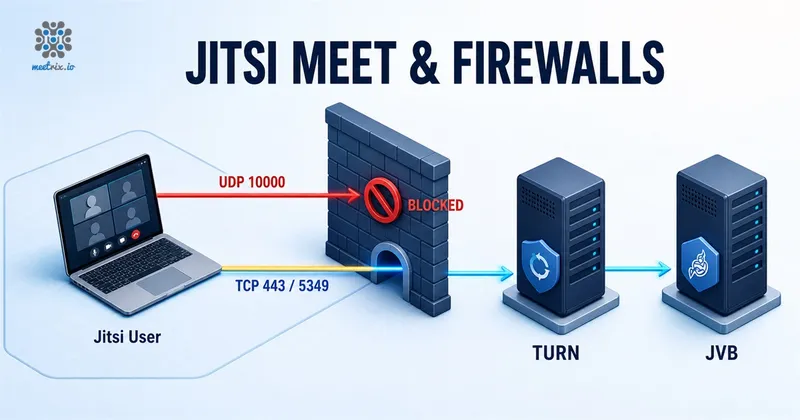
A default Jitsi Meet install sends media over UDP 10000. On most networks that is fine. On a corporate network that allows nothing but TCP 80 and 443 outbound, the meeting loads and then nobody sees anybody, and you need a way to carry the media over TCP instead. The port list itself is covered in what ports you should open to run Jitsi Meet. This page is about the fallback.
How Jitsi VideoBridge 2 Handles WebRTC Traffic
Jitsi Videobridge has the ability to handle webRTC traffic over UDP as well as over TCP.
By default JVB uses UDP, ports 10000 - 20000 for Media Traffic. If client's firewall has no restrictions on these UDP ports, default Jitsi Meet setup should work without any issues. In case if the client's firewall has restrictions on UDP traffic, you can configure videobridge to use a TCP connection between the client behind the firewall and the Videobridge as a fallback (In other words, you can instruct the JVB to consider TCP candidate pairs).
The 10000 to 20000 range belongs to older versions. Current builds use a single media port, ice.udp.port = 10000 in jvb.conf, so opening 10000 alone is enough today.
4 Ways that you can Configure Media Traffic over TCP with JVB
| Option | Status | Why |
|---|---|---|
| JVB on port 4443 | No longer works | The videobridge TCP harvester it relied on has been removed. |
| Nginx multiplexing with Coturn | Works today | Nginx hands the TCP media on 443 to Coturn, which relays it to the bridge over UDP. |
| JVB on a separate server | Not for TCP media | Still worth doing, but for capacity and autoscaling. It gives you no TCP fallback. |
| Turn server on a separate server | Works today | A dedicated Coturn relays the media and gives you fixed IPs to whitelist. |
Two of these four no longer work
jvb.conf defines a single media port, ice.udp.port = 10000, and there is no TCP block in it at all, so DISABLE_TCP_HARVESTER is read by nothing. That rules out the first and third options below on any current build. The two Coturn options are the live answers, and they are the same mechanism at different scales: relay the TCP media through a TURN server. The harvester sections are kept here because a lot of running deployments and older tutorials still carry those lines.
JVB on port 4443 (For single server installations) No longer works
Historical. This worked on JVB 1 and early JVB 2 builds, and does nothing today.
If you have all the jitsi meet components on the same server, the web server (Nginx, Apache or Tomcat) which serves the frontend will occupy the port 443. I this case, we can configure the Jitsi Video Bridge (JVB) to use port 4443 for webRTC Media traffic over TCP. To do that you have to add the following line to /etc/jitsi/videobridge/sip-communicator.properties in JVB.
org.jitsi.videobridge.DISABLE_TCP_HARVESTER=false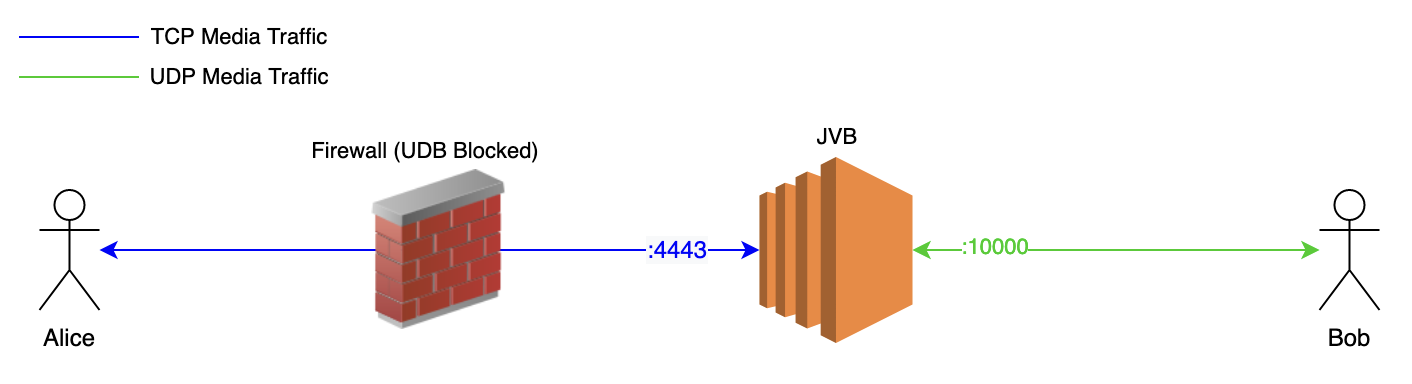
Some strict firewalls do not allow anything other than TCP 80 and 443 for incoming/outgoing traffic. In those cases, this might not work for you.
Nginx Multiplexing with Coturn (For single server installations) Works today
If you really want to keep all the Jitsi components on a single server and do not want to install JVB on a separate server, Nginx which runs on port 443 can be configured to forward the TCP media traffic to Coturn server and then, the Turn server should relay the media to JVB via UDP. Once it is set up, the ICE tester in relay-only mode shows whether the Turn server really relays.
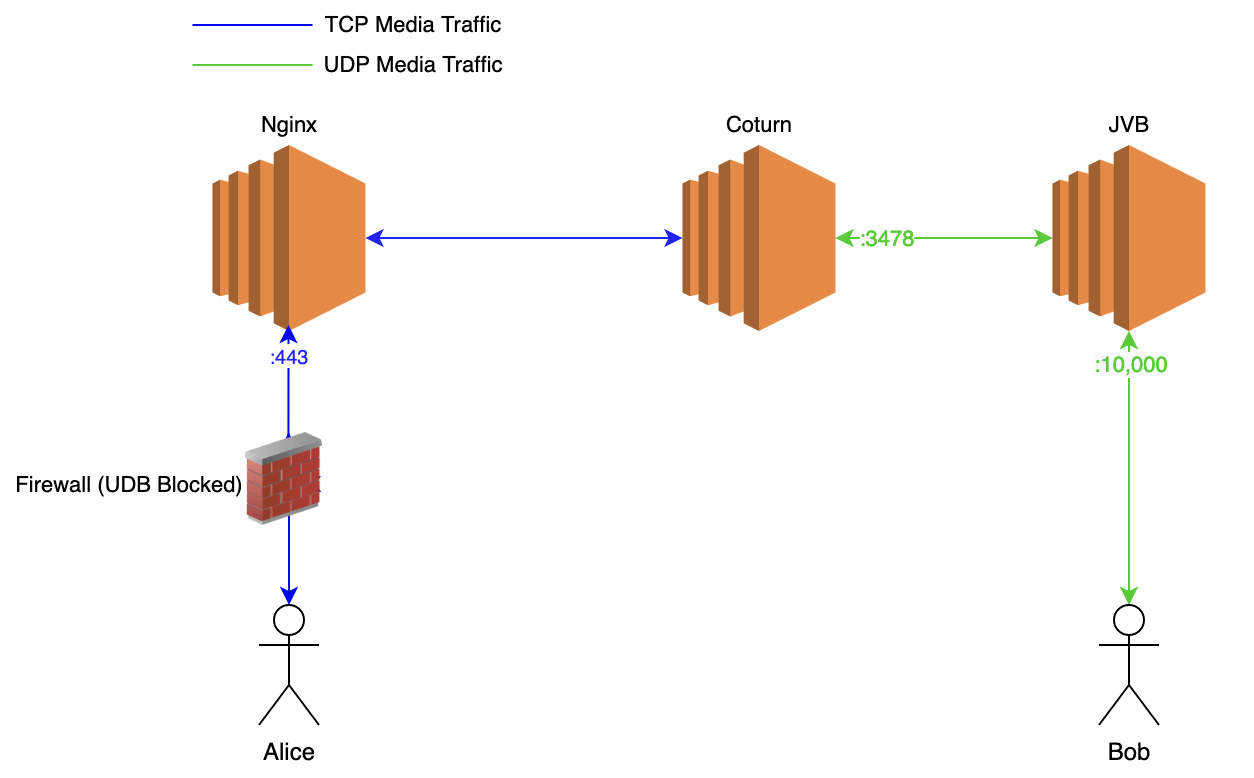
You can follow this guide implement this. Some of the older quick installations used this as the default configuration. If you can find a file in /etc/nginx/modules-enabled/60-jitsi-meet.conf your setup is already configured in this way. But this setup is bit troublesome. The best solution would be to use separate servers for JVBs.
JVB on a Separate Server Not for TCP media
The videobridge no longer supports TCP media on port 443, so moving it to its own server does not solve the firewall problem. Splitting the JVB out is still worth doing, but it is done to add capacity and to autoscale the bridges, not to carry media over TCP.
If you install JVB on a separate server, JVB can be configured use port 443 for TCP media traffic by adding following line to /etc/jitsi/videobridge/sip-communicator.properties in JVB.
org.jitsi.videobridge.DISABLE_TCP_HARVESTER=false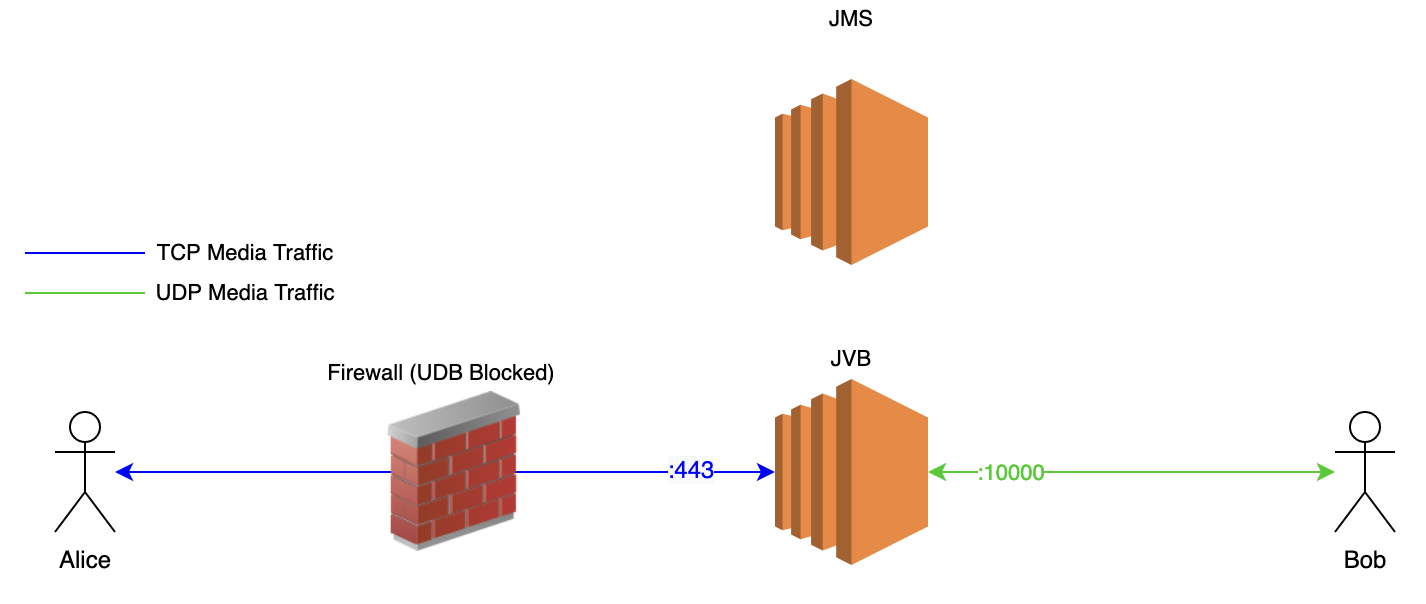
This is a very straightforward solution
Why you actually split the JVB out
Turn server on a Separate Server Works today
If you are using an Autoscaling mechanism and if each JVB gets a dynamic IP while auto scaling and if you need to whitelist the IP Addresses of the media servers in a corporate firewall, you can use a Turn server (In other words, you can use relay candidates).
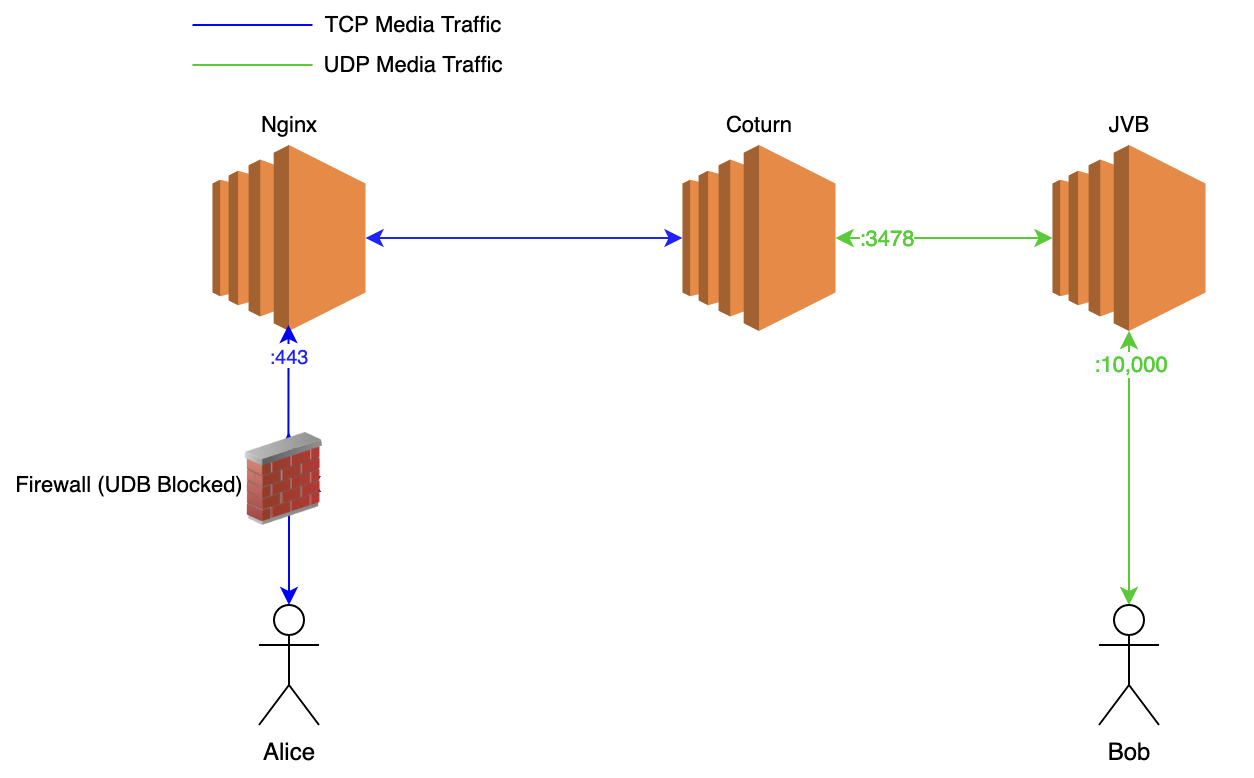
In this way, you can have a fixed number of Turn servers and whitelist their IPs in your Firewall while JVBs are using dynamic IPs. You can follow Setting up a Turn Server for Jitsi Meet guide to setup a Turn Server with tls support to relay media traffic.
Commercial support for Jitsi Meet
Frequently Asked Questions
How do I run Jitsi Meet behind a corporate firewall that blocks UDP?
Relay the media through a TURN server. Either Nginx multiplexing to Coturn on a single server, or a dedicated Turn server, both listening on TCP 443 or 5349. The old approach of enabling TCP on the videobridge itself no longer works.
Does DISABLE_TCP_HARVESTER still work in Jitsi?
No. The videobridge TCP harvester was removed, and current jvb.conf defines only ice.udp.port = 10000 with no TCP block, so the property is read by nothing. Setting it has no effect. Use a TURN server for TCP media instead.
Is TCP 4443 still used by the Jitsi videobridge?
No. Port 4443 was the TCP harvester's listening port on a single-server install. With the harvester gone there is nothing behind that port, so it can stay closed.
Do I need Coturn if I already run a TURN server on the JVB?
The videobridge is not a TURN server and never was. It could accept direct TCP media through the harvester, which is a different mechanism. For TCP media today you need an actual TURN server such as Coturn, on the same box or a separate one.
Why would I put the JVB on a separate server?
For capacity. The videobridge is the CPU and bandwidth bottleneck, so splitting it out lets you scale and autoscale bridges independently of Prosody, Jicofo and the web frontend. It is not a way to get TCP media.
How do I whitelist Jitsi media servers when JVBs autoscale?
Use a Turn server, which means relay candidates. You can keep a fixed number of Turn servers and whitelist their IPs in the firewall while the JVBs behind them use dynamic IPs.
Should I use Nginx multiplexing or a separate TURN server?
Nginx multiplexing keeps everything on one box and is fine for small single-server installs. A separate Coturn server is the better option once you run more than one videobridge or need a fixed set of IPs to whitelist.
Jitsi Meet for 500 Users, TURN Fallback Included
A pre-configured 500-participant Jitsi Meet deployment with the security group rules, videobridge networking and TURN fallback already set up.
Get Jitsi Meet on AWS Marketplace