Jitsi ports you should open
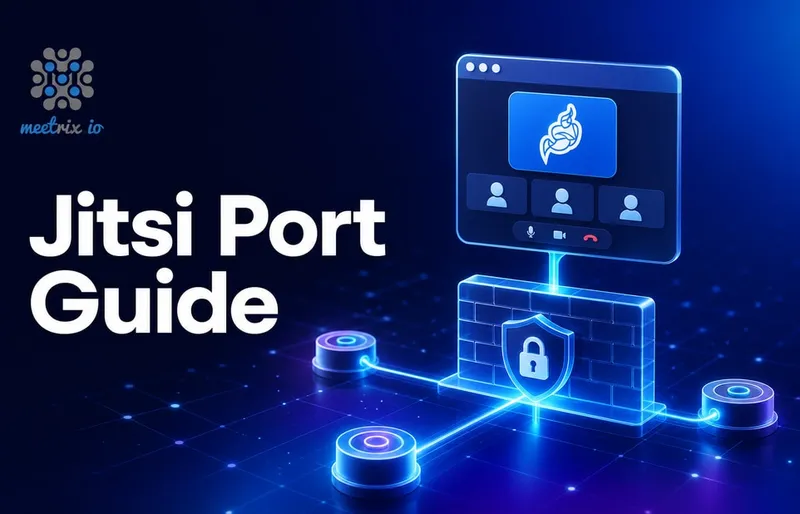
You have to open following ports in your firewall settings (or in EC2 Security groups) to install jitsi-meet. The list matches the firewall section of the official Jitsi quick install guide, which our Ubuntu install walkthrough follows step by step.
| Description | Protocol | Port | Used by | Access Level |
|---|---|---|---|---|
| HTTP Redirect/ SSL Certificate Renewal | TCP | 80 | Nginx | Public |
| HTTPS/Bosh/Secure Websocket | TCP | 443 | Nginx | Public |
| SSH (optional) | TCP | 22 | OS | Private |
| Media Traffic | UDP | 10000 | JVB | Public |
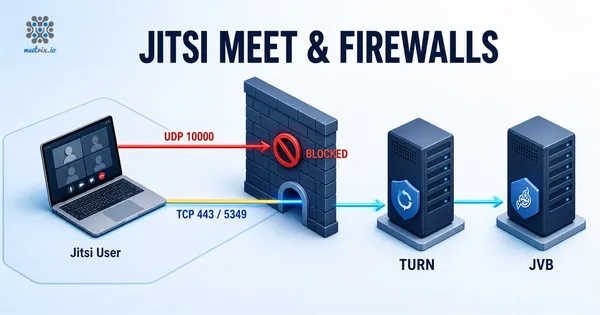
| Media Traffic in Restricted Firewalls | TCP | 5349 | Coturn | Public |
| STUN queries (optional) | UDP | 3478 | Coturn | Public |
| For XMPP components (eg: Jicofo)* | TCP | 5347 | Prosody | Private |
| For external XMPP clients (eg: JVB, Jibri)** | TCP | 5222 | Prosody | Private |
* You only have to open 5347 if you have configured Jicofo on a different server
**You only have to open 5222 and 5347 ports if you have configured Jitsi XMPP clients such as JVB, Jibri and Jigasi on multiple servers, the kind of split our guide to load balancing multiple videobridges sets up.
Why UDP 10000 is the one that breaks installs
Every port above matters, but 10000 is the one that produces the confusing failure. The web page is served over TCP 443, so the meeting room loads, the participant list fills up, and then nobody can see or hear anyone. That is not a Jitsi bug. It is UDP 10000 being closed, or open only to your own IP instead of to the world. To check whether a participant's own network lets UDP through at all, have them run the WebRTC ICE tester.
One correction if you are following an older guide: current builds use a single media port, ice.udp.port = 10000 in jvb.conf (the default lives in the videobridge's reference.conf). The 10000 to 20000 range belongs to older versions. Opening 10000 alone is enough today.
Jitsi firewall ports that should stay private
SSH on 22 goes to your own IP, not to 0.0.0.0/0. The two Prosody ports are the ones people leave open by accident: 5347 for XMPP components such as Jicofo, and 5222 for external XMPP clients such as JVB, Jibri and Jigasi. On a single-server install you do not need either of them open at all, because every component talks to Prosody over localhost. You only open them between your own servers once the setup is split across machines, and even then they should be restricted to those instances, not to the internet.
What happened to Jitsi port 4443
Older versions of this list included TCP 4443 for media traffic in restricted firewalls. That port belonged to the videobridge's own TCP harvester, which let the JVB accept media over TCP when UDP was blocked. The harvester has since been removed from the videobridge. Current jvb.conf defines a single media port, ice.udp.port = 10000, and contains no TCP block at all, so org.jitsi.videobridge.DISABLE_TCP_HARVESTER is now read by nothing.
Leave 4443 closed. If you have it open from an old install, it is doing nothing.
Users behind a firewall that only allows 80 and 443
Commercial support for Jitsi Meet
Frequently Asked Questions
What ports does Jitsi Meet need open?
TCP 80 and TCP 443 for Nginx, and UDP 10000 for media traffic to the videobridge. Add TCP 5349 on Coturn for the TCP fallback when UDP is blocked, and UDP 3478 if you want STUN. TCP 22 for SSH should stay private.
Which Jitsi ports have to be public?
TCP 80, TCP 443 and UDP 10000 are public, plus TCP 5349 and UDP 3478 if you run Coturn. SSH on TCP 22 and the Prosody ports 5222 and 5347 are private.
Do I need to open port 5222 and 5347?
Only in a multi-server setup. Port 5347 is for XMPP components such as Jicofo on a different server, and 5222 is for external XMPP clients such as JVB, Jibri and Jigasi on separate servers. Both should stay private.
What UDP port range does the Jitsi videobridge use?
Older builds used UDP 10000 to 20000. Current versions use the single port UDP 10000, set by ice.udp.port in jvb.conf. Opening just 10000 is enough on a current install.
Is TCP 4443 still needed for Jitsi?
No. Port 4443 belonged to the videobridge TCP harvester, which has been removed. Current jvb.conf has no TCP block at all. If your users are behind a firewall that blocks UDP, relay the media through a Coturn TURN server instead.
Why does my Jitsi call connect but show no video?
Almost always UDP 10000 is closed. The page loads over TCP 443 so the meeting opens normally, then the media never arrives. Check that UDP 10000 is open to the world in your security group, not just to your own IP.
Jitsi Meet for 500 Users, Ports Already Configured
A pre-configured 500-participant Jitsi Meet deployment with the security group rules, videobridge networking and TURN fallback already set up.
Get Jitsi Meet on AWS Marketplace