Self-hosting Matrix with Synapse really comes down to four things: Synapse and PostgreSQL running in Docker, a reverse proxy up front with a TLS certificate, a pair of .well-known files so your server name and your server address don't have to match, and a TURN server if you want calls to actually work. The one thing to nail down before anything else is your server name. Synapse won't let you change it later.
This guide follows Synapse's official documentation. The latest release I could confirm is Synapse 1.161.0, and the examples pin that version. The Compose file is my own assembly of the documented pieces, so double-check the commands against the docs for whichever version you end up installing.
What Synapse Is
Matrix is an open protocol for chat and calls. A homeserver stores your users' accounts and room history, and it talks to other homeservers, which is what makes it federated. Someone on your server can message someone on matrix.org, and neither of you needs an account on the other's server. Synapse is the homeserver Element maintains, written in Python with some Rust.
Element Web, Element X, and the other Matrix clients are separate programs. This guide only covers the server side. Your users connect with whichever client they prefer. If you're still deciding between Matrix and an all-in-one product, our Rocket.Chat vs Mattermost comparison covers where each one fits next to Matrix.
Check the licence first
What You Need
Prerequisites
The examples use example.com as the Matrix server name and matrix.example.com as the hostname where Synapse actually runs. Swap both for your own.
Docker is the easiest route, and it's one of the officially documented ones alongside distribution packages and pip. If you go the pip route instead, note that Synapse's docs list Python 3.10 through 3.13 as supported.
Choose Your Server Name First
The server name ends up in every user ID: @alice:example.com. Synapse's docs are blunt about this: pick it before you install, because it can't be changed later.
Most people want short IDs on their main domain (example.com) while the server itself lives on a subdomain (matrix.example.com). That's what delegation is for, and it's covered further down. The catch is that once you've committed to example.com, a mistake here means a new server and new accounts for everyone.
Docker Compose Setup
Create a folder for the deployment and add a docker-compose.yml with Synapse and PostgreSQL. Synapse's docs are clear that SQLite is for testing only, so start with Postgres and skip the migration headache later.
services:
  db:
    image: postgres:16
    restart: unless-stopped
    environment:
      POSTGRES_USER: synapse_user
      POSTGRES_PASSWORD: change-this-password
      POSTGRES_DB: synapse
      # Synapse requires UTF8 encoding and the C locale
      POSTGRES_INITDB_ARGS: "--encoding=UTF-8 --lc-collate=C --lc-ctype=C"
    volumes:
      - pgdata:/var/lib/postgresql/data

  synapse:
    image: matrixdotorg/synapse:v1.161.0
    restart: unless-stopped
    depends_on:
      - db
    volumes:
      - synapse-data:/data
    ports:
      - "127.0.0.1:8008:8008"

volumes:
  pgdata:
  synapse-data:
The POSTGRES_INITDB_ARGS line matters. The Synapse docs say the database must be created with UTF8 encoding and the C locale for collation and character type, and that Synapse refuses to start if it isn't. The official docs create the database with createdb --encoding=UTF8 --locale=C --template=template0. The environment variable does the same job on first start.
Port 8008 is bound to 127.0.0.1 on purpose. Only the reverse proxy should be able to reach it.
Generate and Edit the Config
Synapse's Docker image can generate its own homeserver.yaml. The official command uses docker run with a named volume. This is the Compose form of the same thing:
docker compose run --rm -e SYNAPSE_SERVER_NAME=example.com -e SYNAPSE_REPORT_STATS=no synapse generateSYNAPSE_SERVER_NAME is your Matrix server name, the one you just chose. SYNAPSE_REPORT_STATS is mandatory and takes yes or no. The command writes the config, a signing key, and a log config into the /data volume.
Now edit homeserver.yaml in that volume. Replace the default SQLite database block with PostgreSQL, using the values from your Compose file. The host is the service name, db:
database:
  name: psycopg2
  args:
    user: synapse_user
    password: change-this-password
    dbname: synapse
    host: db
    cp_min: 5
    cp_max: 10

# Where clients reach Synapse (the reverse proxy address)
public_baseurl: https://matrix.example.com/
While you're in the file, check the listener on port 8008. Behind a reverse proxy it needs x_forwarded: true, so Synapse trusts the client address the proxy passes along. The generated config may already have it. If it doesn't, add it.
Then start everything:
docker compose up -d
docker compose logs -f synapse
Wait for Synapse to log that it's listening. If it exits with an error about the database locale instead, jump to common problems.
Reverse Proxy and TLS
Synapse's docs say to forward requests for /_matrix and /_synapse/client to Synapse, serve clients on port 443, and set the X-Forwarded-For and X-Forwarded-Proto headers. Issue a certificate for matrix.example.com with certbot or your usual tool first. Then a minimal nginx server block looks like this:
server {
    listen 443 ssl;
    listen [::]:443 ssl;
    server_name matrix.example.com;

    ssl_certificate     /etc/letsencrypt/live/matrix.example.com/fullchain.pem;
    ssl_certificate_key /etc/letsencrypt/live/matrix.example.com/privkey.pem;

    location ~ ^(/_matrix|/_synapse/client) {
        proxy_pass http://localhost:8008;
        proxy_set_header X-Forwarded-For $remote_addr;
        proxy_set_header X-Forwarded-Proto $scheme;
        proxy_set_header Host $host:$server_port;
        client_max_body_size 50M;
        proxy_http_version 1.1;
    }
}
Three details are easy to miss. The client_max_body_size has to match max_upload_size in homeserver.yaml, or large uploads fail at the proxy. The proxy must not normalise or canonicalise the request URI, because Synapse depends on it arriving untouched. And the reverse proxy docs say not to expose /_synapse/admin to the public internet.
Keep the admin API private
/_matrix and /_synapse/client, so the admin endpoints stay unreachable from outside. If you widen it to /_synapse, you expose them.
Delegation With .well-known
Without delegation, other Matrix servers look for yours at example.com on port 8448. If Synapse runs on matrix.example.com, you need to tell them where to look. Synapse's delegation docs do this with a file at /.well-known/matrix/server on your server name's domain, served over HTTPS on port 443.
{"m.server": "matrix.example.com:443"}Because federation now goes to port 443, you don't need to open 8448 at all. Clients use a second file, /.well-known/matrix/client, from the Matrix specification:
{"m.homeserver": {"base_url": "https://matrix.example.com"}}Both files must be served by whatever answers HTTPS for example.com. If that's a separate website, add them there. If it's the same nginx, this works:
location /.well-known/matrix/server {
    default_type application/json;
    return 200 '{"m.server": "matrix.example.com:443"}';
}

location /.well-known/matrix/client {
    default_type application/json;
    add_header Access-Control-Allow-Origin *;
    return 200 '{"m.homeserver": {"base_url": "https://matrix.example.com"}}';
}
The Access-Control-Allow-Origin header on the client file lets web clients like Element Web read it from a browser.
Create Your First User
Synapse creates users with a script that reads the registration_shared_secret from your config. Run it inside the container:
docker compose exec synapse register_new_matrix_user -c /data/homeserver.yamlIt prompts for a username, a password, and whether the user is an admin. Make your own account an admin. Synapse's docs point out that this works regardless of enable_registration, so you can leave public sign-ups off.
Protect the shared secret
registration_shared_secret can create accounts, admins included, even with enable_registration set to false. Treat it like a password and keep homeserver.yaml out of any public repository.
Test Federation and Login
Check the pieces from outside the server, in this order:
# Delegation files on your server name's domain
curl https://example.com/.well-known/matrix/server
curl https://example.com/.well-known/matrix/client

# Synapse itself, through the reverse proxy
curl https://matrix.example.com/_matrix/client/versions
Then run your domain through the Matrix Federation Tester. If it passes, sign in to any Matrix client with example.com as the homeserver and your new user, then join a room on another server. That's the real test.
Add a TURN Server for Calls
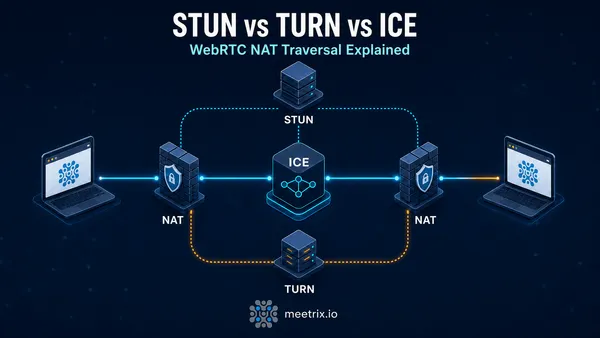
Chat works without TURN. Calls often don't. Synapse's docs list a TURN server as required for reliable voice and video, because callers behind strict NATs or firewalls can't connect directly. Our STUN vs TURN explainer covers why.
You run coturn separately (our Coturn image is one way to get it), then point Synapse at it in homeserver.yaml. The secret must match coturn's shared secret:
turn_uris:
  - "turn:turn.example.com?transport=udp"
  - "turn:turn.example.com?transport=tcp"
turn_shared_secret: "use-the-same-secret-as-coturn"
turn_user_lifetime: 86400000
turn_allow_guests: true
The docs' example leaves turn_allow_guests at true. Set it to false if you don't allow guest access. On the firewall, coturn needs TCP and UDP on 3478 and 5349, plus UDP on the relay range, 49152 to 65535 by default.
| Port | Protocol | Used for |
|---|---|---|
| 443 | TCP | Clients, and federation with .well-known delegation |
| 8448 | TCP | Federation, only if you don't delegate |
| 3478, 5349 | TCP and UDP | TURN (coturn) |
| 49152 to 65535 | UDP | TURN relay range |
For group calls you need more than TURN. Element's newer calls run on LiveKit, and our Element Call and MatrixRTC guide picks up exactly where this one stops, on the same Synapse.
Before You Invite Anyone
A short checklist, all of it from the earlier steps and Synapse's docs:
- Public registration is off. Leave
enable_registrationatfalseand create accounts with the script until you've decided you want open sign-ups. - The admin API isn't reachable from the internet. Test with
curlfrom a machine outside your network and expect a failure on anything under/_synapse/admin. - Your server is on PostgreSQL, not SQLite, so you won't have to migrate a database that already has your team's history in it. Synapse 1.143.0 dropped support for PostgreSQL 13, so 14 or newer is required.
- Email is configured if you want password resets and notifications. Synapse's docs list it as optional, but without it a user who forgets their password needs an admin to help.
- You've taken one backup and restored it somewhere.
None of that takes long, and every item is harder to fix after people have started using the server.
Backups and Upgrades
Two things hold your server: the PostgreSQL database, and the /data volume with your config, media, and the signing key that identifies your server to other homeservers. Back up both. A database dump is one command:
docker compose exec db pg_dump -U synapse_user synapse > synapse-backup.sqlCopy the synapse-data volume too, and test a restore at least once. A backup you've never restored is just a guess.
To upgrade, change the image tag in docker-compose.yml, read the upgrade notes for every version you're skipping, then pull and restart. That's why the Compose file pins a version instead of using latest: you decide when the server changes.
docker compose pull
docker compose up -d
Major PostgreSQL upgrades are a different job. They need a dump and restore, not a tag change, so leave the postgres image version alone until you've planned it.
Common Problems
Synapse won't start and complains about the database locale
The database was created with the wrong collation or character type. Synapse refuses to start in that case unless you set allow_unsafe_locale: true. That override exists, but the docs warn about issues when the locale library changes underneath the database.
Fix: dump the data, recreate the database with UTF8 encoding and the C locale from the template0 database, and restore. On a brand-new server it's simpler to remove the pgdata volume and let the Compose file create it correctly.
Other servers can't reach yours
Usually the server .well-known file. It must be valid JSON, served over HTTPS on port 443 from your server name's domain, and point to a hostname with a valid certificate.
Fix: run the curl commands from the test step, then the federation tester, and read what it says. If you skipped delegation, port 8448 has to be open instead.
Element says it can't find or reach the homeserver
Web clients read /.well-known/matrix/client from a browser, so a missing file or missing CORS header breaks the lookup even when Synapse is fine.
Fix: curl -i the client file and check for the Access-Control-Allow-Origin header and a correct base_url.
Uploads fail on large files
The reverse proxy is rejecting them before they reach Synapse.
Fix: raise client_max_body_size to match max_upload_size in homeserver.yaml, then reload nginx.
Is It Worth Self-Hosting?
It depends who's going to own it. Self-hosting Synapse means someone owns upgrades, backups, certificate renewals, and the 2 a.m. page when the database fills the disk. For a small team that only wants chat, a hosted homeserver is usually the better deal. For anyone who needs the data on their own infrastructure, that trade is the whole point.
If you have residency or compliance requirements, that's the case for owning it. Our piece on sovereign video conferencing covers the calling side of the same argument. And if you're already running LiveKit for calls, the self-hosting LiveKit on AWS guide shows the same approach for that half of the stack.
Frequently Asked Questions
Can I change my Synapse server name later?
No. Synapse's docs say to choose the server name before you install, because it cannot be changed afterwards. It appears in every user ID, so a wrong choice means starting a new server.
Does Synapse need PostgreSQL?
For anything beyond a test, yes. Synapse's docs say SQLite should not be used in production and that almost all installations should use PostgreSQL. Synapse performs poorly on SQLite, especially in large rooms.
Which ports does a Synapse server need open?
Port 443 for clients and, with .well-known delegation, for federation too. Port 8448 is only needed if you don't delegate. If you add a TURN server, it also needs 3478, 5349 and the UDP relay range.
How much RAM does Synapse need?
Synapse's docs ask for at least 1 GB of free RAM if you'll join large public rooms. For a small private server, I'd start with a 2 GB machine and watch memory use before sizing up.
How do I create the first Synapse user?
Run register_new_matrix_user against your homeserver.yaml, which uses the registration_shared_secret. It works even with enable_registration set to false, so you don't have to open public sign-ups.
Do I need a TURN server for Matrix calls?
Synapse's docs list a TURN server as required for reliable voice and video calls. Without one, calls between users behind strict NATs or firewalls often fail to connect.
Is Synapse free for commercial use?
Synapse is free under the AGPL, or available under a paid Element Commercial License. Element's free ESS Community edition is not intended for commercial production. Businesses should check the AGPL terms or contact Element before deploying.
Will my server federate with matrix.org?
Yes, once your server name resolves correctly and the federation test passes. Federation is on by default, so the checks that matter are your .well-known file and a valid TLS certificate.
Give Your Matrix Calls a TURN Server
A pre-configured Coturn TURN and STUN server for AWS and Google Cloud, so calls still connect behind strict NATs and firewalls.
See the Coturn Image