You deploy a static site to S3, open it, and the page has no styling. The console says:
Resource interpreted as Stylesheet but transferred with MIME type application/xmlNewer Chrome versions word it more bluntly: "Refused to apply style from '...' because its MIME type ('application/xml') is not a supported stylesheet MIME type, and strict MIME checking is enabled."
Our original 2018 answer to this was "set the Content-Type to text/css", and sometimes that is the fix. But far more often, the application/xml is a clue that the browser isn't getting your CSS at all.
First, find out what S3 actually sent
Request the stylesheet directly and look at the response:
curl -i https://example.com/assets/css/main.css | head -20You get one of two results.
Cause 1: an S3 error document
HTTP/2 403
content-type: application/xml

<?xml version="1.0" encoding="UTF-8"?>
<Error><Code>AccessDenied</Code><Message>Access Denied</Message>...
That XML is S3's error page. The CSS file is missing at that path, or the bucket won't serve it. NoSuchKey means the path is wrong. AccessDenied is either a permissions problem or, confusingly, also a missing file: when the caller isn't allowed to list the bucket, S3 answers 403 instead of 404 for keys that don't exist.
Check these in order:
- The path. Case matters on S3:
Main.cssandmain.cssare different objects. Relative paths break when a site moves to a sub-path, which is why Jekyll'sbaseurland similar settings exist. - The upload. Is the file really in the bucket, under exactly that key?
- Access. With CloudFront and Origin Access Control, the bucket policy must allow the distribution to read the object.
Cause 2: the file is there, with the wrong Content-Type
HTTP/2 200
content-type: application/xml

body { margin: 0; ... }
A 200 with your CSS in the body means the file is fine and only its label is wrong. S3 serves whatever Content-Type was stored with the object at upload time. Upload tools that can't guess a file's type, or that are told the wrong one, produce exactly this.
Fixing the Content-Type
In the S3 console
- Open the object in the bucket.
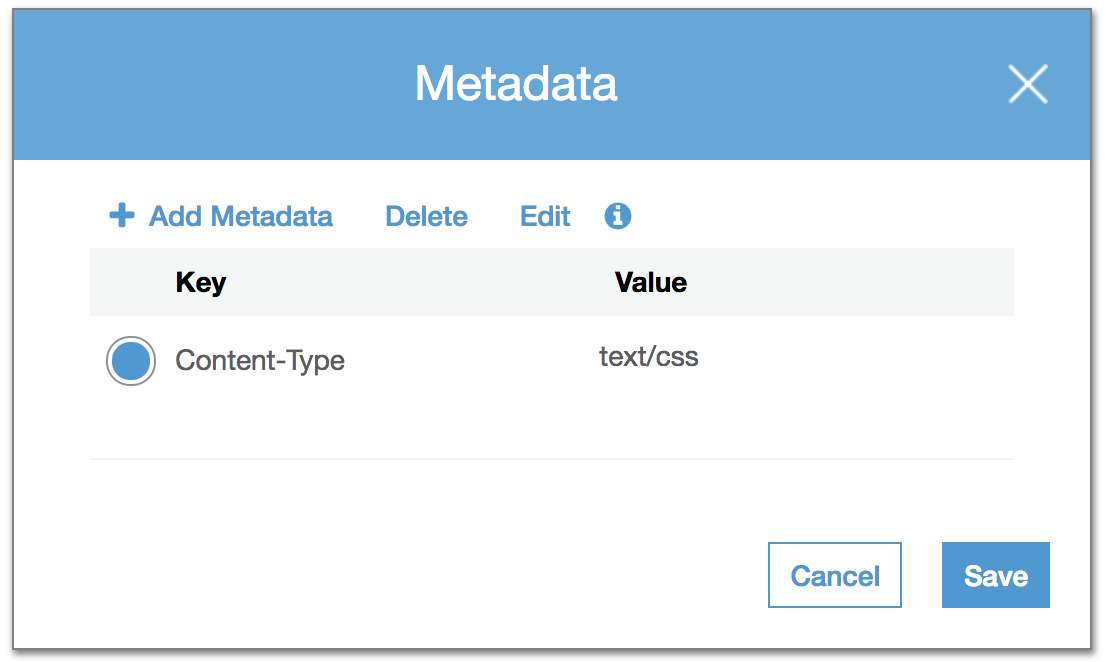
- Go to Properties, then Metadata, and choose Edit.
- Set the system-defined key
Content-Typetotext/cssand save.
With the AWS CLI, for many files
S3 can't edit metadata in place, so you copy each object onto itself with new metadata:
aws s3 cp s3://my-bucket/assets/css/ s3://my-bucket/assets/css/ \
  --recursive --exclude "*" --include "*.css" \
  --content-type text/css --metadata-directive REPLACE
Keep --exclude "*" --include "*.css" exactly like that. Without the filter, every file in the folder gets labelled as CSS. --metadata-directive REPLACE also drops other metadata such as Cache-Control, so add those back in the same command if you use them.
Stop it happening again
aws s3 sync guesses the Content-Type from each file's extension, and gets CSS, JS and HTML right. Problems usually come from custom upload scripts or from files with no extension. In CI, sync the whole build folder with the CLI rather than uploading files one by one with a hand-set type.
Then clear the cache
If CloudFront sits in front of the bucket, it keeps serving the old response, headers included, until the cache expires. Invalidate the path:
aws cloudfront create-invalidation --distribution-id E123EXAMPLE --paths "/assets/css/*"Then reload with the cache disabled in the browser's developer tools. Browsers also respect X-Content-Type-Options: nosniff; with that header set, which it should be, a wrong Content-Type is always fatal instead of a warning. That is a good thing: fix the type, don't remove the header.
We hit this first while hosting our Jekyll blog next to a React app on S3; the whole setup is in hosting a Jekyll blog under /blog on AWS. For getting the CLI working, see installing the AWS CLI, and for big uploads in the same pipeline, copying large files to S3. The AWS docs on S3 object metadata list the other system headers you can set the same way.
Frequently Asked Questions
What does 'Resource interpreted as Stylesheet but transferred with MIME type application/xml' mean?
The page asked for a CSS file, but the server answered with something labelled as XML. On Amazon S3 that is usually an XML error document, such as AccessDenied or NoSuchKey, meaning the file path is wrong or the object is not readable.
How do I fix the MIME type of a CSS file on S3?
Set the object's Content-Type metadata to text/css, in the S3 console under the object's Properties and Metadata, or by copying the object onto itself with aws s3 cp --content-type text/css --metadata-directive REPLACE.
Why does Chrome say 'Refused to apply style because its MIME type is not a supported stylesheet MIME type'?
Same problem, newer wording. Browsers now refuse stylesheets with the wrong Content-Type instead of just warning, especially when the X-Content-Type-Options: nosniff header is set. Fix the Content-Type, or the path if the response is an error.
I fixed the Content-Type but the error is still there. Why?
CloudFront or the browser is still serving the cached copy with the old headers. Create a CloudFront invalidation for the file and reload with the cache disabled in developer tools.