Running coturn in Docker looks simple until the first call fails to connect and you realize the container never had a real path for relay traffic. The image itself is small and the setup is genuinely quick, five minutes if nothing goes wrong, but almost everyone hits the same wall on their first attempt: default Docker networking and a TURN server's port requirements don't get along.
This covers the actual working docker-compose.yml, the turnserver.conf settings that matter, and the one networking decision that determines whether your container works under real call load or just in a quick local test.
Quick answer
Jump to a section
Prerequisites
Before you start
- Docker Engine and Docker Compose installed on a Linux host (host networking, the mode this guide uses, is a Linux-only Docker feature and behaves differently on Docker Desktop for Mac/Windows).
- A server with a public, static IP address. TURN relay doesn't work behind CGNAT or a residential IP that changes.
- A domain name pointed at that IP if you want TLS (turns:) support, plus a certificate for it.
- Ports 3478 and 5349 (TCP and UDP) and your chosen relay port range open on the host firewall and any cloud security group in front of it.
The official coturn Docker image
The image to use is coturn/coturn on Docker Hub, maintained directly by the coturn project rather than a third party. It ships in a Debian-based variant and a smaller Alpine-based one (tags like 4.14-alpine), and both get updated in step with upstream coturn releases. Pin a specific tag in production; don't run latest and find out a relay behavior changed the same week as an incident.
The image exposes three ways to configure the server: a mounted turnserver.conf, command-line flags appended after the image name, or a small set of environment variables for automatic IP detection. That third option is where most people get tripped up, more on that below.
Docker Compose setup for coturn
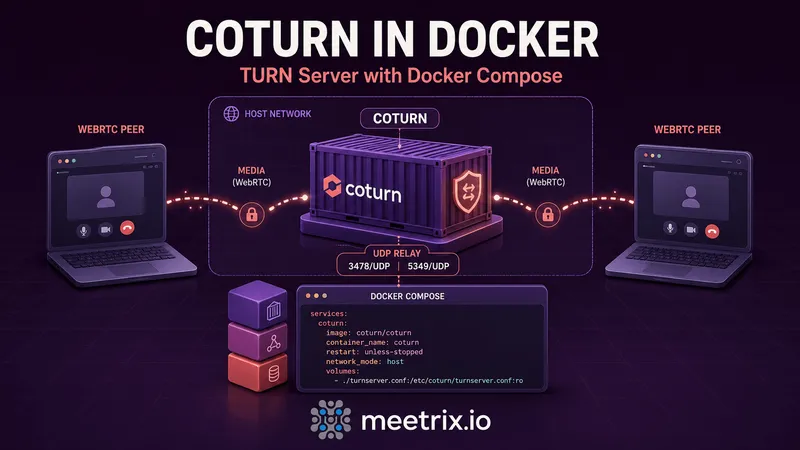
Here's a docker-compose.yml that actually works, not the stripped-down version that only handles the STUN side:
services:
  coturn:
    image: coturn/coturn:4.14-alpine
    container_name: coturn
    restart: unless-stopped
    network_mode: host
    volumes:
      - ./turnserver.conf:/etc/coturn/turnserver.conf:ro
      - ./certs:/etc/coturn/certs:ro
      - coturn-data:/var/lib/coturn

volumes:
  coturn-data:
Two things worth noticing. There's no ports: block, that's not a mistake, host networking makes it redundant and Compose will ignore it anyway. And coturn-data is a named volume rather than a bind mount, since the only thing living at /var/lib/coturn/ is transient session state you don't need to inspect from the host.
Bring it up the normal way:
docker compose up -d
docker compose logs -f coturn
Configuring turnserver.conf
This is the file that does the actual work. A minimal but production-usable version:
listening-port=3478
tls-listening-port=5349
min-port=49152
max-port=65535

external-ip=203.0.113.10
realm=turn.example.com

use-auth-secret
static-auth-secret=replace-this-with-a-long-random-string

cert=/etc/coturn/certs/fullchain.pem
pkey=/etc/coturn/certs/privkey.pem

no-cli
no-multicast-peers
log-file=stdout
A few of these matter more than they look like they do:
- external-ip: set this to your server's actual public IP, not left blank. Behind NAT (most cloud VMs technically are, even with a public IP attached), coturn needs to be told what address to advertise to clients, or relay candidates come back with the private IP and nothing connects.
- realm: this is one of the "other target keywords" people search for directly, and it's simple: it's just a string, usually your domain, that scopes the authentication realm. It doesn't need DNS to point anywhere for TURN itself to function, though your TLS cert does.
- use-auth-secret / static-auth-secret: this is the long-term credential mechanism (HMAC-based, time-limited username/password pairs), the same approach used in Meetrix's own Coturn AWS AMI. It's simpler to operate than a static username/password list and doesn't need a database.
- no-cli: disables coturn's telnet-based admin CLI on port 5766. There's no reason to expose that inside a container, and leaving it on is a needless attack surface.
Environment variables vs the config file
If you searched specifically for coturn Docker environment variables to set TURN_REALM or similar, here's the direct answer: the official image doesn't have them. It only supports four environment variables, and they're all about IP autodetection, not TURN behavior:
| Variable | Purpose |
|---|---|
DETECT_EXTERNAL_IP | Auto-detect the container's external IPv4 address at startup |
DETECT_RELAY_IP | Auto-detect the IPv4 address to use for relay allocations |
DETECT_EXTERNAL_IPV6 | Same as above, for IPv6 |
DETECT_RELAY_IPV6 | Same as above, for IPv6 relay |
Everything else, realm, static-auth-secret, TLS certs, the port range, has to go through turnserver.conf or a CLI flag appended to the docker run / Compose command line. If you've seen a blog post or Stack Overflow answer showing a TURN_REALM= environment variable working, that's almost certainly a third-party image, not the official one, and it won't carry over if you switch images later.
Why host networking matters
This is the part that breaks most first attempts, including ones copied from tutorials that skip it. TURN needs a wide UDP port range open for relay allocations, 49152 to 65535 by default, over 16,000 ports. Docker's normal approach to exposing ports, a -p flag or a ports: block per port, spins up a separate docker-proxy userspace process for each one. Sixteen thousand of those will bring a host to its knees well before you get real traffic.
network_mode: host sidesteps the problem entirely: the container shares the host's network stack directly, no NAT, no per-port proxy, no translation layer for coturn to fight with when it tries to figure out its own external IP.
If you can't use host networking
One more thing worth knowing before you deploy: a coturn GitHub issue (#966) documents exactly this problem showing up as calls that connect then drop, with "allocation watchdog determined stale session state" in the logs, traced back to the container guessing the wrong external IP under host networking. Setting external-ip explicitly, as in the config above, is what avoids it.
Testing the container
Once the container is running, generate a temporary username and password against your static-auth-secret:
secret=replace-this-with-a-long-random-string && \
time=$(date +%s) && \
expiry=86400 && \
username=$(( $time + $expiry )) && \
echo username:$username && \
echo password:$(echo -n $username | openssl dgst -binary -sha1 -hmac $secret | openssl base64)
Then plug the server address, generated username, and password into the Trickle ICE test tool, hit gather candidates, and look for a relay candidate in the results. No relay candidate means the container is running but not actually usable as a TURN server yet, usually an external-ip, firewall, or port range problem rather than anything wrong with coturn itself. Our WebRTC ICE tester runs the same check and explains each candidate it finds in plain English.
Troubleshooting
- Container starts but no relay candidate appears: check that
external-ipin turnserver.conf matches the server's actual public IP, and confirm the security group or firewall in front of it allows the full min-port to max-port UDP range, not just 3478 and 5349. - Works locally, fails for remote users: almost always a firewall or security group gap on the relay port range, or the container running without host networking and only 3478/5349 published.
- TLS handshake fails on 5349: the certs volume mount path has to match exactly what
certandpkeypoint to inside the container. A relative path typo here fails silently in the logs unless you're watching closely. - High CPU under load: if you're not on host networking, this is very often the docker-proxy overhead described above rather than coturn itself struggling.
When to skip the DIY setup
Running coturn in Docker is the right call when you want full control over the config, you're already running a Docker-based stack, or you're testing before committing to infrastructure. It's also one more service you now own: patching the image, watching disk and memory, rotating certs, and being the one who gets paged when the relay port range gets blocked by a network change nobody told you about.
If you'd rather not run that pager duty yourself, Meetrix maintains a pre-configured Coturn AMI for AWS and a matching GCP image, both with the networking, TLS, and long-term credentials already wired up correctly out of the box. There's also a one-click deployment option if you want the cost savings of self-hosting without touching a docker-compose.yml at all. And if the TURN server is specifically for a Jitsi Meet deployment, the Jitsi TURN setup guide and the Jitsi AWS guide (or its GCP counterpart) cover the config differences that come up there specifically.
Frequently Asked Questions
What is the official coturn Docker image?
It's coturn/coturn on Docker Hub, maintained by the coturn project itself. It ships in Debian-based and Alpine-based variants (the alpine tags are noticeably smaller). Third-party images like instrumentisto/coturn exist too, but the official image is the one to reach for first.
Does the coturn Docker image support environment variables like TURN_REALM?
No. The official image only exposes a handful of env vars for automatic IP detection (DETECT_EXTERNAL_IP, DETECT_RELAY_IP, and their IPv6 equivalents). Realm, static-auth-secret, and every other TURN setting come from a mounted turnserver.conf file or CLI flags, not environment variables.
Why does coturn need network_mode: host in Docker?
Coturn relays media over a wide UDP port range, 49152 to 65535 by default. Mapping that whole range with Docker's normal port publishing spins up a docker-proxy process per port, which chokes the host under real call load. Host networking skips that layer entirely.
Can I run coturn in Docker without host networking?
Yes, if you narrow the relay range first. Set min-port and max-port to something like 49152 to 49352 in turnserver.conf, then publish that smaller range plus 3478 and 5349 in your compose file. It works, but it caps how many simultaneous relayed calls the server can handle.
How do I generate TURN credentials for testing a coturn container?
With use-auth-secret and a static-auth-secret set in turnserver.conf, generate a time-limited username and password with an HMAC-SHA1 script (openssl dgst -hmac), then test them against the container with the WebRTC Trickle ICE tool before wiring it into your app.
Where does coturn store its data in Docker?
The image writes to /var/lib/coturn/ by default, mainly SQLite state for the turnserver process. If you're only using long-term credentials via static-auth-secret rather than a user database, you can mount that path as tmpfs since there's nothing worth persisting across restarts.
Skip the Docker Setup Entirely
Launch a pre-configured coturn server on AWS with networking, TLS, and credentials already handled correctly.
Get Coturn on AWS Marketplace