A 2022 test, kept as published
The question behind this test was simple: how far can one modest videobridge go before meetings degrade? Instead of adding servers until problems disappeared, we kept the infrastructure deliberately small and pushed participant counts up.
The hardware in the test
Everything ran on AWS:
- Jitsi Meet server (nginx, Prosody and Jicofo): 2 vCPU, 2 GB RAM, one instance.
- Jitsi Videobridge: 4 vCPU, 8 GB RAM, one instance.
Participants were a mix of test bots and real devices. During the largest run, people also joined from an Android phone (Galaxy Note 9) and an iPhone X, through both mobile browsers and the native apps, to check that the meeting stayed usable on phones, not only on the bots.
The results
| Participants | Sending video and audio | Videobridge CPU | Videobridge RAM | Client GPU |
|---|---|---|---|---|
| About 45 | About 45, HD video bots | About 85% | Not recorded | Not recorded |
| 100 | 6 | 76% | 1.52 GB | 33% |
| 134 | 8 | 88% | 2.22 GB | 38% |
| 235 | 2 | 92% | 2.56 GB | 35% |
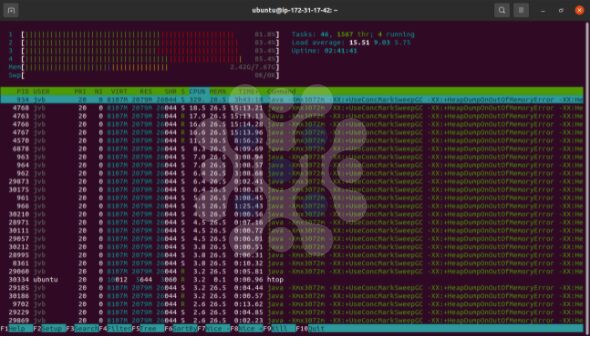
The bridge during one of the high-load runs, with all four cores in the mid-80% range and most of the work in videobridge threads:
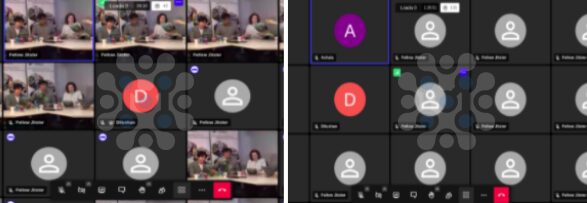
And the meeting itself in tile view: a few participants sending camera video, and the rest joined with video off.
What the numbers mean
Video senders drive the load, not participants. The same bridge that reached about 85% CPU with roughly 45 people all sending HD video carried 235 people at 92% when only 2 of them sent video. If you remember one thing from this test, make it that: size a bridge by how many cameras will be on, not by the headcount.
Adding senders costs more as meetings grow. Going from 100 to 134 participants while adding only two more video senders pushed CPU from 76% to 88%. Every sender's stream has to be forwarded to more receivers in a bigger meeting.
Memory was never the constraint. The bridge used at most 2.56 GB of its 8 GB. CPU and bandwidth are what run out.
The signaling server barely noticed. Prosody and Jicofo on a 2 vCPU, 2 GB machine had little load at these sizes. Their limits show up with many concurrent conferences, not with a single large one.
Limits of this test
Being honest about what this doesn't show matters as much as the numbers:
- Each size was a single run on one day, with a 2022 Jitsi release.
- Bots don't behave exactly like people; real users switch speakers, share screens and join late.
- Bandwidth wasn't recorded in this summary, and on many deployments it limits a bridge before CPU does.
- Everything was in one meeting. Many smaller meetings stress the system differently.
Jitsi Meet bandwidth requirements
This test recorded CPU and memory, not bandwidth, so it cannot hand you a megabits-per-participant figure. What it does show is where such a number comes from: every sender's stream is forwarded to every receiver, so bandwidth grows with senders multiplied by participants, the same shape as the CPU numbers above. On a bridge with CPU headroom to spare, the network interface is usually what runs out first, which is why sizing has to measure both on your own infrastructure.
If you are planning a deployment, run the test on your own infrastructure with your own meeting pattern. Load testing Jitsi Meet explains how, and once one bridge isn't enough, load balancing multiple videobridges covers the next step. Jitsi's architecture explains what each server in this setup does.
Frequently Asked Questions
What hardware does Jitsi Meet need for 100 participants?
In this 2022 test, one 4 vCPU, 8 GB videobridge carried 100 participants with 6 sending video at about 76% CPU, and the signaling server ran on 2 vCPU and 2 GB. Video senders matter far more than headcount, so size for your expected speakers.
How many participants can one Jitsi meeting have?
It depends on how many send video. In this test, 235 participants fit on one bridge with 2 video senders, while about 45 all sending HD video pushed the same bridge to 85% CPU. Larger meetings need more bridges and stream limits.
Does Jitsi Meet need a lot of RAM?
Not for the bridge in this test: memory stayed between 1.5 and 2.6 GB on an 8 GB machine while CPU climbed past 90%. CPU and bandwidth are the limits to plan around; memory rarely is.
How much bandwidth does Jitsi Meet need?
This test did not record bandwidth, so treat any single figure with suspicion. It scales with senders multiplied by receivers, because each sender's video is forwarded to everyone else. Measure it on your own deployment alongside CPU.
What server size does a small Jitsi Meet deployment need?
In this 2022 test, 2 vCPU and 2 GB carried nginx, Prosody and Jicofo comfortably, while the videobridge needed 4 vCPU and 8 GB. Signaling stays light for one large meeting; the bridge is what you size up.