Moodle is free. Running it well is not. Between PHP versions, the database, cron, file storage and SSL, a school or training team can lose a week before the first course goes live. This guide covers the shortcut: Moodle on AWS from a pre-configured Meetrix AMI, plus the few steps after launch that you shouldn't skip.
In short
Quick video guide
What Is Moodle?
Moodle is an open source learning management system used by universities, schools, companies and governments around the world. It supports:
- Course creation and management
- Role-based user access (students, teachers, admins)
- Multimedia lesson delivery
- Quizzes, forums, assignments and gradebooks
- Integration with SCORM, LTI, H5P, and external tools
- Learning analytics and reporting
If you're still choosing a platform, our Moodle vs Open edX vs Canvas comparison covers when each one fits.
AWS Moodle deployment: how the Meetrix AMI works
The AMI is a Moodle server that's already installed: web server, PHP, database and Moodle itself, on Ubuntu 24.04. A CloudFormation template launches it into your own AWS account with an IAM role that lets the server request Let's Encrypt certificates for a domain in Route 53. Your courses, users and files live on your EC2 instance and its EBS volume, not on a vendor's platform.
How to deploy Moodle on AWS
- Open the Moodle listing on AWS Marketplace, subscribe, and choose the CloudFormation launch.
- Fill in the stack: admin email, your domain name, a key pair and the instance type (t3.small to start).
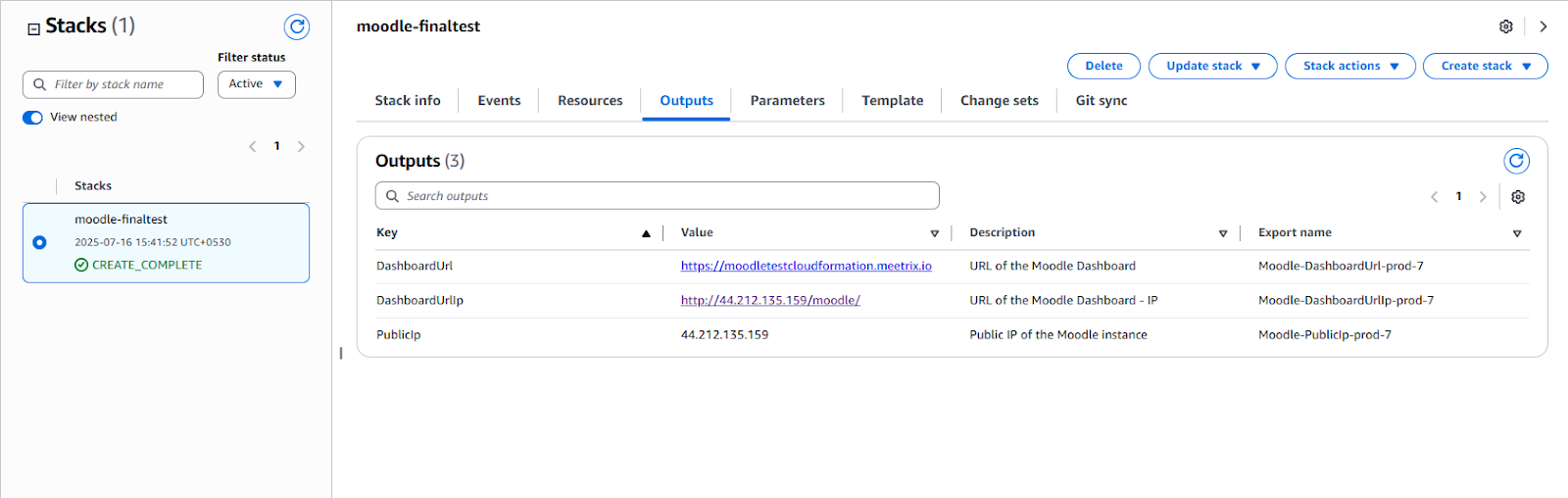
- When the stack completes, create a DNS record pointing your domain at the PublicIp from the Outputs tab.
- SSH into the server and run the SSL setup command from the developer guide to issue the certificate.
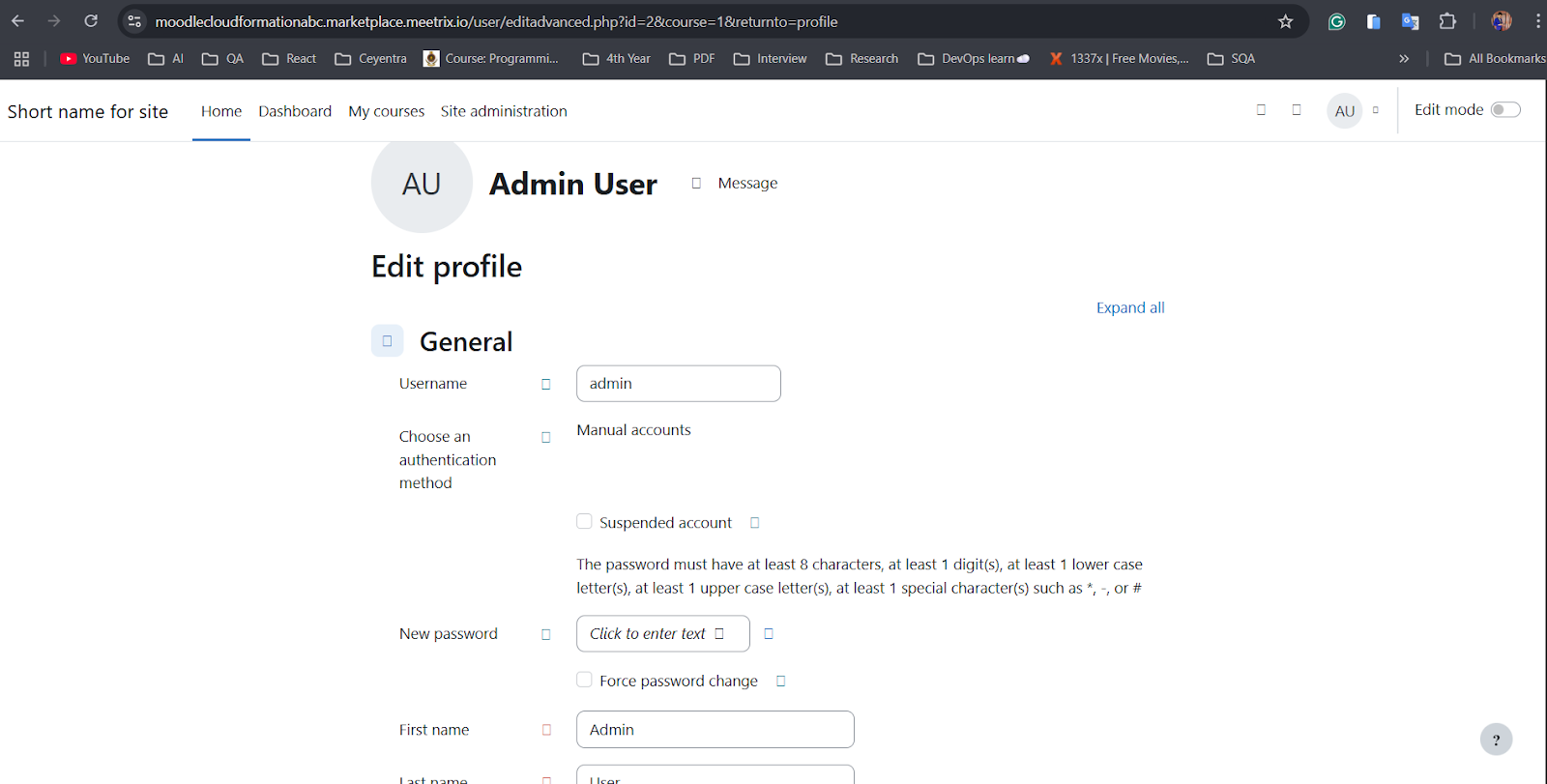
- Open the DashboardUrl, sign in with the default admin account, and change its username, password and email straight away.
- Go to Site administration to set the site name, time zone, email (SMTP) and authentication options.
Running an LMS on AWS: sizing and cost
A t3.small (2 vCPU, 2 GB RAM) is fine for a pilot or a small school. Moodle's load is spiky: quiet most of the week, then everyone submits an assignment or starts a quiz in the same ten minutes. Size for those moments. Move to a t3.medium or an m-family instance before exam season, and keep an eye on CPU credits, since burstable instances slow down once they run out.
The bill is the EC2 instance plus the Meetrix software fee shown on the listing for your instance type, plus EBS storage and snapshots. Course video is the thing that grows storage fastest; host long videos elsewhere and embed them if you can.
After launch: securing your Moodle site
- Change the default admin credentials before you share the URL with anyone.
- Turn off self-registration unless you really want open sign-ups, and create accounts by upload or through your identity provider.
- Keep the Moodle cron running (it is on the AMI) so emails, grades and cleanup tasks happen.
- Snapshot the EBS volume on a schedule. It holds the database and the moodledata files.
- Update Moodle and its plugins when security releases come out, testing on a copy of the server first.
Who runs Moodle on AWS
| Segment | Use Case Examples |
|---|---|
| Higher Education | Host courses, assignments and exams for students |
| K-12 Schools | Deliver remote or hybrid instruction with parent access |
| Corporate Training | Onboard staff and track role-based certification |
| Nonprofit Training | Create multilingual e-learning for global outreach |
| Government | Run internal training behind your own network controls |
| EdTech Startups | Build LMS-based products or services for clients |
For live classes inside courses, see integrating Jitsi with Moodle and our piece on Jitsi virtual classrooms. Students can also use the Moodle mobile app once mobile services are switched on.
Frequently Asked Questions
How do I deploy Moodle on AWS?
Subscribe to the Meetrix Moodle listing on AWS Marketplace, launch its CloudFormation template with your domain, admin email and instance type, point the domain at the server, then SSH in to issue the SSL certificate. Log in, change the default admin password, and start building courses.
What instance size does Moodle need on AWS?
A t3.small is the recommended starting point for a pilot or a small school. Moodle is PHP and database heavy, so move to a t3.medium or larger before a busy exam week rather than during it, and watch CPU credits on burstable instances.
Can I customize the Moodle theme and plugins?
Yes. You get full admin access on the site and root on the server, so you can install themes and plugins from the Moodle plugins directory or upload your own. Check each plugin supports your Moodle version before an upgrade.
Does Moodle on AWS work with the Moodle mobile app?
Yes. Enable mobile services under Site administration, make sure the site runs on HTTPS, and students can sign in with the official Moodle app for Android and iOS, including offline access to downloaded course content.
Is a self-hosted Moodle on AWS GDPR or FERPA compliant?
Self-hosting gives you the control to be compliant: you pick the AWS region, own the data and set retention. Moodle also has built-in privacy tools for data requests and policies. Compliance still depends on how you configure and run it.
Deploy Moodle on AWS
A pre-configured Moodle LMS in your own AWS account, with email support from Meetrix.
Get Started on AWS Marketplace