Listing currently unavailable
What Is Fooocus?
Fooocus is a free, open-source image generator built on Stable Diffusion XL (SDXL). Where other SDXL front ends hand you dozens of sliders, Fooocus asks for a prompt and picks the sampler, steps and refiner settings itself. So it's a sensible first stop if you want a self-hosted AI image generator without learning ComfyUI first. It's often pitched as a free Midjourney rival. That holds for general prompts. It holds less well for text inside images, which SDXL still gets wrong a lot.
Below: how to install Fooocus on a Google Cloud GPU server, and the local download route if you'd rather run it on your own PC. The Fooocus GitHub repo is the source for the version and hardware details below.
Benefits of GCP Deployment
Deploying Fooocus on Google Cloud Platform (GCP) offers significant advantages, including robust scalability, enhanced security, and exceptional performance. GCP's infrastructure ensures that Fooocus can handle high workloads efficiently, providing users with a seamless and reliable experience.
It also makes for a beginner-friendly Fooocus setup. Most local installs that fail do so on GPU drivers and CUDA versions, and a prepared cloud image has those sorted before you log in.
Fooocus 2.5: Latest Version and Release Notes
The latest Fooocus release is 2.5.5. Version 2.5.0 added the Enhance feature, which finds faces, hands or other regions in a finished image and re-renders them with more detail. The point releases after it, 2.5.1 through 2.5.5, are bug fixes. You'll also see the version written as "2.5 5"; it's the same build. The full Fooocus 2.5.5 release notes are in the project's update log.
One thing to know before you commit: Fooocus is now in limited long-term support, meaning bug fixes only. It is built entirely on SDXL and won't pick up newer model families like Flux. If you need those, ComfyUI or Forge is the better home, and our Fooocus vs Automatic1111 vs ComfyUI comparison walks through the trade-offs.
Key Features of Fooocus
- Advanced Image Generation: Text-to-image, inpainting, outpainting and upscaling all run from the same screen. The 2.5 line added the Enhance tool, which re-renders faces, hands and other details after the first pass.
- Presets, Including Realistic: Fooocus ships with default, anime and realistic presets. On Windows you pick one with
run_realistic.batorrun_anime.bat. On Linux, start it withpython entry_with_update.py --preset realistic. The Fooocus 2.5.5 realistic preset swaps in a photographic checkpoint and style set. - API Support: Fooocus offers robust API compatibility, enabling seamless integration into various applications. This makes it a versatile tool for developers looking to incorporate AI-powered image generation into their projects.
- User-Friendly Interface: The web UI of Fooocus is designed to cater to both beginners and experts, offering an intuitive and easy-to-navigate experience. The interface allows users to effortlessly harness the power of AI for their image creation needs.
- Enhanced GPU Utilization: Fooocus 2.5 is optimized for efficient GPU use, ensuring faster processing and better performance, particularly when handling complex tasks or large datasets. This feature is particularly beneficial for users on GCP who require scalable and high-performance computing resources.
Advantages of Using Fooocus
- Cost-Effective Alternative: Fooocus stands out as a budget-friendly alternative to premium AI-powered image creation tools like Midjourney, DALL-E, and Firefly. Despite its lower cost, Fooocus delivers comparable, if not superior, capabilities, making it an excellent choice for individuals and businesses looking to maximize value.
- Single-Click Deployment: Deploying Fooocus on Google Cloud Platform is made incredibly simple with the pre-configured AMI. Users can get started quickly with a single-click deployment, significantly reducing the setup time and technical complexity usually associated with AI tool installations.
- Scalability with GCP Integration: Fooocus leverages the scalability of Google Cloud Platform, allowing users to easily adjust resources based on their needs. Whether it's handling a high volume of image requests or scaling down during low-demand periods, GCP's flexible infrastructure ensures optimal performance and cost-efficiency.
- Security and Compliance: Deploying Fooocus on GCP ensures that your data is protected with industry-leading security measures. GCP offers robust compliance and security features, including encryption at rest and in transit, which are crucial for safeguarding sensitive image data and ensuring compliance with regulations.
Why Choose Meetrix’s Fooocus GCP Image?
- Simplified Setup: Meetrix's Fooocus GCP image offers an easy, one-click deployment, streamlining the setup process with pre-configured settings that cater to both beginners and experts.
- Optimized for Performance: The image is optimized to ensure that Fooocus runs efficiently, even under heavy loads, with enhanced resource management and security configurations.
- GDPR Compliance: While not fully deployed with GDPR by default, the Meetrix GCP image can be customized to meet GDPR requirements, offering flexibility for users handling sensitive data.
- Scalable and Secure: The image leverages GCP's robust infrastructure, offering scalability to meet growing demands and built-in security features to protect your deployments from threats.
Fooocus 2.5.5 Download: Running It Locally Instead
If you would rather run Fooocus on your own machine, take the Fooocus download from the project's GitHub releases page. Third-party download sites tend to carry old builds, or worse.
- On Windows, download the 7z package, extract it, and run
run.bat(or one of the preset launchers above). - On Linux, clone the repo, set up a Python 3.10 environment, install
requirements_versions.txt, and start it withpython entry_with_update.py. Stick to 3.10, the version the README specifies, because newer Python releases tend to break the pinned dependencies. - No GPU? Try the official Colab notebook linked in the README first.
Fooocus Download Size and System Requirements
The package itself is small. The first launch is the slow part, because Fooocus downloads the default SDXL checkpoint and its supporting models, several gigabytes in all. The README puts the minimum at 4GB of VRAM on a recent Nvidia card plus 8GB of system RAM. It will run there, but more of both makes a real difference to generation time.
Prerequisites
- GCP Account: Ensure you have an active Google Cloud Platform (GCP) account with the necessary permissions to create and manage resources.
- Basic GCP Knowledge: A fundamental understanding of GCP services, particularly Compute Engine and networking, is essential for deploying Fooocus.
- Machine Requirements: To run Fooocus efficiently, you'll need a machine with a GPU, preferably an NVIDIA T4, and the recommended machine type is n1-standard-8 for optimal performance. Check that your region offers the card on Google's Compute Engine GPU list, and compare hourly rates in our AWS vs GCP GPU cost breakdown.
How to Install Fooocus on GCP
Step 1: Accessing GCP Marketplace
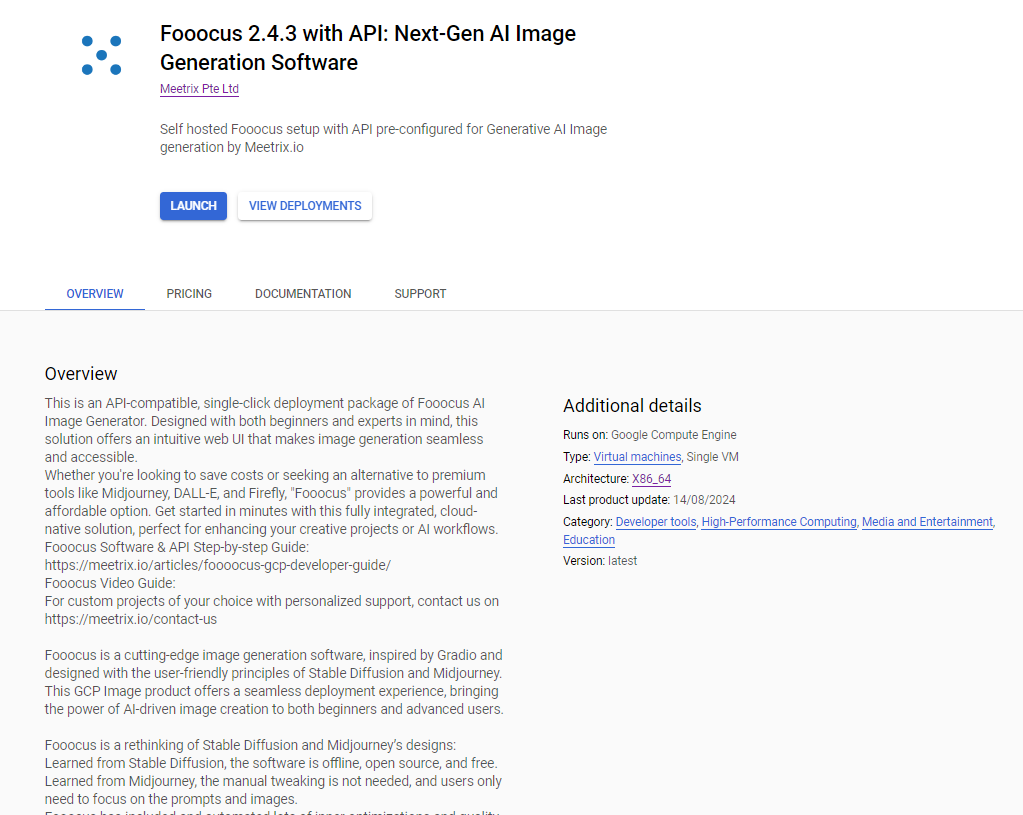
- Start by logging into your Google account. Head over to the GCP Marketplace and look for the Fooocus solution offered by Meetrix Pte Ltd.
Step 2: Initial Setup and Configuration
- Go through the product details and pricing.
- Click "GET STARTED," choose your project, and agree to the terms.
- Set up your deployment by specifying a deployment name, selecting a service account, and configuring the domain and zone.
- Choose the recommended machine type and GPU, and input the necessary details like Admin Email and Domain Name for SSL configuration.
- Customize boot disk size and SSH access based on your requirements.
Installing SSL Certificates
DNS Configuration:
- Navigate to your DNS provider and create an A record pointing to the Fooocus external IP address.
SSL Setup:
- Access your server through SSH via the GCP console.
- Install SSL certificates by running the command
sudo certbot --nginx(Certbot requests and renews a free Let's Encrypt certificate). - Follow the on-screen prompts to complete the SSL installation process, ensuring your domain is properly secured with HTTPS.
Accessing and Running Fooocus
Access the Fooocus Dashboard:
- Use your configured domain to access the Fooocus web UI and explore the API documentation.
Starting and Stopping Fooocus:
- Manage the Fooocus instance directly from the GCP Compute Engine VM Instance menu by selecting the "Start" or "Stop" options.
Removing Fooocus:
- To uninstall Fooocus, go to the GCP solutions page and delete the deployment. This will remove all associated resources from your Google Cloud account.
Fooocus API
Fooocus API provides REST interfaces to access various image generation capabilities, including text-to-image conversion, image upscale, inpainting, outpainting, and image prompt functionalities.
Key API Endpoints:
- Text-to-Image: Generate images from text prompts.
- Image-Upscale-Vary: Upscale or apply variations to existing images.
- Image-Inpaint-Outpaint: Modify or extend images by filling in missing parts or adding new content.
- Job Queue Management: Manage and query image generation tasks.
Using the API:
You can access and utilize these APIs by sending HTTP POST requests with parameters like prompts, image data, and configuration settings. The API supports synchronous and asynchronous processing, and responses include URLs to generated images and job status updates. For more detailed API documentation, refer to the official Fooocus API documentation.
Need Any Support:
For commercial support with Fooocus installation or API setup, our dedicated team at Meetrix is ready to assist. Whether you're looking to deploy Fooocus on GCP or need help with advanced configurations, we offer tailored solutions to meet your specific needs. Contact us at support @meetrix.io or visit our Contact Us page to discuss how we can help you achieve your goals efficiently and effectively. Let us help you get the most out of Fooocus!
Tips: Creating High-Quality Prompts for Image Generation via Fooocus:
- Be Specific and Descriptive: Use clear and detailed language to describe the desired image. Include specifics like objects, actions, environments, and lighting conditions.
- Use Contextual Keywords: Incorporate relevant keywords that convey the mood, style, or artistic direction, such as "vintage," "cyberpunk," or "realistic."
- Experiment with Prompts: Vary your prompts to explore different results. Start with simple descriptions and gradually add complexity to see how the output changes.
- Leverage Negative Prompts: If Fooocus supports negative prompts, use them to specify what should be avoided in the image, such as "without text" or "no blur."
- Incorporate Style Preferences: If the API supports style parameters, choose styles that align with your vision, like "watercolor" or "digital art."
- Use Consistent Structure: When creating a series of images, maintain a consistent prompt structure to ensure uniformity across the outputs.
- Iterate and Refine: Review the generated images and tweak the prompts based on the results. Refining your prompts will help in achieving the desired quality.
- Utilize Advanced Parameters: If available, adjust advanced settings like sharpness, guidance scale, or model choice to fine-tune the output quality.
These tips will help you craft prompts that better align with the visual outcome you’re aiming to achieve, leading to higher-quality image generation with Fooocus.
Troubleshooting Common Issues
502 Bad Gateway Error:
If this error occurs, wait a few minutes and refresh the page to resolve the issue.
Checking Server Logs:
To diagnose problems, use the command sudo tail -f /var/log/syslog to monitor server logs for any errors or warnings.
sudo tail -f /var/log/syslogService Status:
Check the status of the Fooocus services with sudo systemctl status fooocus.service. If the service is not running, restart it using sudo systemctl restart fooocus.service.
sudo systemctl status fooocus.servicesudo systemctl status fooocusapi.serviceIf any of them is not working, use one of the below command to restart the relevant service.
sudo systemctl restart fooocus.servicesudo systemctl restart fooocusapi.serviceStorage Issues:
If storage is running low, consider adding a new disk. Follow Google's documentation for guidance on how to do this.
Fooocus vs Midjourney vs DALL-E vs Stable Diffusion
Here's a detailed comparison table for Fooocus, Midjourney, DALL-E, and Stable Diffusion across various aspects of image generation:
| Feature | Fooocus | Midjourney | DALL-E | Stable Diffusion |
|---|---|---|---|---|
| Primary Focus | AI-driven image creation with inpainting, API support | Artistic, stylized image generation | Realistic text-to-image generation | Open-source, versatile model for image generation |
| Ease of Use | User-friendly, web-based UI, API for advanced users | Operated through Discord; requires familiarity | Simple web interface, easy for general users | Requires technical knowledge, setup involved |
| Customization | High via API and advanced settings | Limited, focuses on artistic output | Moderate, based on text prompts | Extensive, with multiple models and parameters |
| Deployment | Single-click GCP deployment with Meetrix AMI | Cloud-based, accessed via Discord | Cloud-based API and web interface | Open-source, can be deployed locally or on cloud |
| Cost | Cost-effective, flexible pricing | Subscription-based, higher cost | Pay-per-use with credits | Free with optional paid cloud services |
| Output Quality | High-quality, detailed images | Highly stylized, unique artistic images | Realistic images, good detail | Variable, depending on model and settings used |
| Best For | Developers, users needing customization and cost efficiency | Artists, designers seeking stylized art | Quick, realistic images from text | Researchers, developers, and tech-savvy users |
| Speed | Moderate to fast depending on GPU used | Generally fast, optimized for artistic rendering | Moderate, varies with input complexity | Can be fast with appropriate hardware setup |
| Community Support | Growing, community forums and support available | Large, active community on Discord | Supported by OpenAI, good community base | Very large, active open-source community |
| Supported Input | Text prompts, image uploads for inpainting | Text prompts, focuses on artistic interpretation | Text prompts for realistic outputs | Text prompts, images, extensive input flexibility |
| Output Formats | PNG, customizable formats via API | PNG, JPEG, high-res art formats | PNG, JPEG | PNG, JPEG, custom formats with modifications |
| API Access | Full API access for integration and advanced use | Limited to basic commands in Discord | Comprehensive API access for developers | Extensive API support through open-source libraries |
| Scalability | Scalable via GCP infrastructure | Limited to Discord's capabilities | Scalable via OpenAI’s cloud | Highly scalable, depending on deployment setup |
| Security | GDPR compliant, secure on GCP | Secure through Discord, limited by platform | Secure on OpenAI’s platform | Security depends on deployment setup, flexible options available |
| Learning Curve | Moderate, API documentation available | Easy for basic use, deeper features require exploration | Easy for general use | Steep learning curve, especially for advanced use cases |
This table provides a comprehensive look at how these four image generation tools compare across a variety of critical aspects, helping you choose the right tool based on your specific needs and technical requirements.
The "best" tool among Fooocus, Midjourney, DALL-E, and Stable Diffusion depends on your specific needs:
- Fooocus: Ideal for developers and users seeking customization, with advanced API access and cost-effective deployment options.
- Midjourney: Great for artists and designers looking for highly stylized, artistic images with a large community on Discord.
- DALL-E: Suitable for users needing realistic text-to-image outputs with simple interfaces and comprehensive API support.
- Stable Diffusion: Best for researchers and tech-savvy users who need extensive customization and open-source flexibility.
Security Best Practices
Firewall Configuration:
Set up firewall rules to restrict access to necessary ports and services, ensuring that only authorized traffic reaches your Fooocus instances.
Regular Security Audits:
Conduct regular security checks and updates to protect against vulnerabilities, ensuring your setup remains secure.
User Access Control:
Implement strict user access controls to manage permissions, ensuring that only authorized personnel can access and manage Fooocus.
Scaling Fooocus for Enterprise Use
Horizontal Scaling:
Discuss how you can scale Fooocus horizontally by adding more instances to handle higher workloads, enabling it to meet growing demands.
Load Balancing:
Implement load balancers to distribute incoming traffic evenly across multiple Fooocus instances, optimizing performance and preventing bottlenecks.
Data Backup and Disaster Recovery
Automated Backups:
Set up automated backups for Fooocus data and configuration settings, ensuring you can recover from data loss quickly.
Disaster Recovery Planning:
Develop a comprehensive disaster recovery plan, including data replication to multiple regions and regular testing of backup restoration to ensure readiness in case of an outage.
Monitoring and Maintenance
Monitoring Tools:
Utilize GCP’s monitoring tools like Stackdriver to track Fooocus’s performance, uptime, and system health in real-time, ensuring immediate response to any issues.
Routine Maintenance:
Schedule regular maintenance tasks such as system updates, log cleanups, and security patching to ensure that Fooocus operates efficiently and remains secure.
Frequently Asked Questions
Is Fooocus 2.5.5 the latest version?
Yes. Fooocus 2.5.5 is the most recent release, and the project is now in limited long-term support, so future updates are bug fixes only. Searches for "fooocus 2.5 5" point to the same build.
Where should I get the Fooocus download?
Only from the official lllyasviel/Fooocus releases page on GitHub. Windows users grab the 7z package, Linux and Mac users clone the repo. Third-party download sites often host outdated or modified builds.
What is the Fooocus minimum VRAM requirement?
The README lists 4GB of VRAM on a recent Nvidia GPU and 8GB of system RAM as the floor. It runs at that level, but slowly. On GCP, an NVIDIA T4 with 16GB of VRAM is a comfortable starting point.
How big is the Fooocus download?
The app itself is small. The first launch is what takes time: it downloads the default SDXL checkpoint and supporting models, several gigabytes in total, so leave plenty of free disk space.
Can Fooocus run Flux models?
No. Fooocus is built on SDXL and, in bug-fix-only support, won't add Flux. People searching for a Fooocus Flux installation usually end up on ComfyUI or Forge, which both load Flux checkpoints.
Can I run Fooocus on Google Colab?
Yes. The Fooocus README links an official Colab notebook that runs on Colab's GPUs. For steady or shared use, a GCP VM with its own GPU avoids Colab's session limits and disconnects.
Conclusion
In summary, deploying Fooocus on GCP offers a robust and scalable solution for AI-driven image creation. The integration with GCP provides enhanced performance, security, and ease of use, making it an ideal choice for developers and enterprises alike. By leveraging Fooocus’s advanced features and the scalability of GCP, you can push the boundaries of what’s possible in image generation.
Don’t hesitate to explore the advanced features Fooocus has to offer, and consider integrating additional GCP services to further optimize your setup. Start experimenting with Fooocus today to unlock its full potential, and stay ahead in the ever-evolving world of AI-driven creativity.
For expert commercial support in setting up Fooocus or integrating its API, the Meetrix team is here to help. Whether you're deploying Fooocus on Google Cloud Platform or need assistance with advanced configurations, our professionals can provide the guidance you need. Reach out to us at support@meetrix.io or visit our Contact Us page to discuss how we can support your project and ensure your Fooocus setup is optimized for success.