
Once you customize the Jitsi Meet front end, you need a way to ship it that isn't "build on my laptop and scp the files". This is the GitLab pipeline we use for customer deployments: every push to the main branch goes to staging, and every version tag goes to production.
I first wrote this up in 2022. The shape hasn't changed, but the Node version has, and a few shortcuts from the original are worth undoing.
Step 1: protect your release tags
Production deploys run from tags like v1.0, v1.1. Protect that pattern so only maintainers can create them: Settings > Repository > Protected tags, enter v*, and choose who may create them.
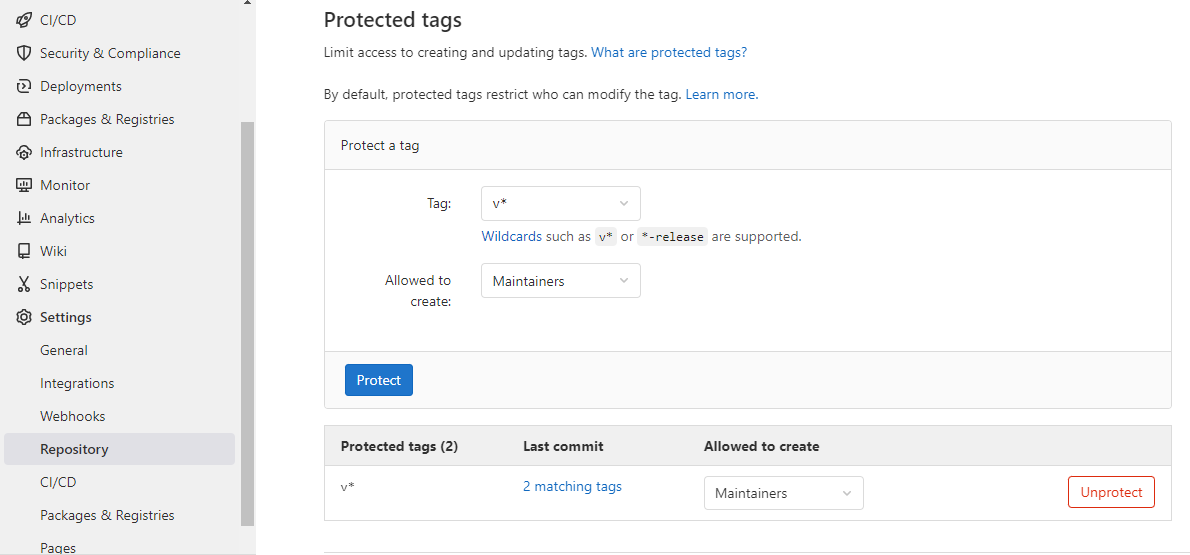
This matters for more than access control. Protected CI variables, which is where the SSH key goes, are only handed to pipelines on protected branches and protected tags. Skip this step and the production job runs with empty variables.
Step 2: add the CI/CD variables
Under Settings > CI/CD > Variables, add the connection details for each server and tick Protect variable on every one:
PRODUCTION_SSH_HOST   203.0.113.10
PRODUCTION_SSH_USER   ubuntu
PRODUCTION_SSH_PORT   22
STAGING_SSH_HOST      203.0.113.20
STAGING_SSH_USER      ubuntu
SSH_PRIVATE_KEY       (type: File, contents of the private key)
SSH_KNOWN_HOSTS       (output of ssh-keyscan for both servers)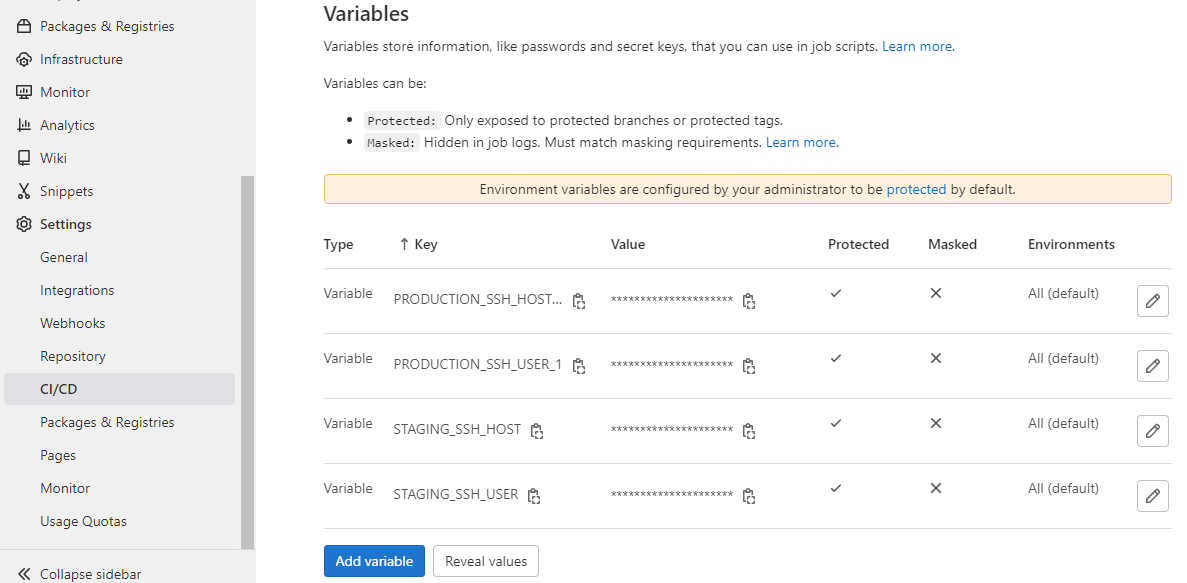
Step 3: a deploy key for the servers
Generate a key pair used only by the pipeline:
ssh-keygen -t ed25519 -f jitsi-deploy -C "gitlab-ci jitsi deploy" -N ""
ssh-keyscan -p 22 203.0.113.10 203.0.113.20   # paste the output into SSH_KNOWN_HOSTS
Paste the private key (jitsi-deploy) into the SSH_PRIVATE_KEY variable as a File type. Append the public key (jitsi-deploy.pub) to ~/.ssh/authorized_keys for the deploy user on each server. The deploy user needs passwordless sudo for the extract command; limit it to that one command in /etc/sudoers.d/ if you can.
Step 4: the .gitlab-ci.yml for Jitsi deployment
Add this at the root of your jitsi-meet fork, or paste it into Build > Pipeline editor:
stages:
  - build
  - deploy

build:
  stage: build
  image: node:24-bookworm-slim
  script:
    - apt-get update && apt-get install -y make bzip2 git
    - npm ci
    - make source-package
  artifacts:
    paths:
      - jitsi-meet.tar.bz2
    expire_in: 1 week
  rules:
    - if: $CI_COMMIT_BRANCH == $CI_DEFAULT_BRANCH
    - if: $CI_COMMIT_TAG =~ /^v/

.deploy:
  stage: deploy
  image: alpine:3.20
  before_script:
    - apk add --no-cache openssh-client
    - mkdir -p ~/.ssh && chmod 700 ~/.ssh
    - cp "$SSH_PRIVATE_KEY" ~/.ssh/id_ed25519 && chmod 600 ~/.ssh/id_ed25519
    - echo "$SSH_KNOWN_HOSTS" > ~/.ssh/known_hosts
  script:
    - scp -P "$DEPLOY_PORT" jitsi-meet.tar.bz2 "$DEPLOY_USER@$DEPLOY_HOST:~/"
    - ssh -p "$DEPLOY_PORT" "$DEPLOY_USER@$DEPLOY_HOST" "sudo tar -xjf ~/jitsi-meet.tar.bz2 -C /usr/share"

staging:
  extends: .deploy
  environment: staging
  variables:
    DEPLOY_HOST: $STAGING_SSH_HOST
    DEPLOY_USER: $STAGING_SSH_USER
    DEPLOY_PORT: "22"
  rules:
    - if: $CI_COMMIT_BRANCH == $CI_DEFAULT_BRANCH

production:
  extends: .deploy
  environment: production
  variables:
    DEPLOY_HOST: $PRODUCTION_SSH_HOST
    DEPLOY_USER: $PRODUCTION_SSH_USER
    DEPLOY_PORT: $PRODUCTION_SSH_PORT
  rules:
    - if: $CI_COMMIT_TAG =~ /^v/
What each part does:
- build runs
make source-package, a target in the jitsi-meet Makefile that compiles the app and packs the deployable files intojitsi-meet.tar.bz2, with a top-leveljitsi-meet/folder. - staging runs on every push to the default branch.
- production runs only when a
v*tag is created, which only maintainers can do. - Extracting into
/usr/sharereplaces/usr/share/jitsi-meet, the directory nginx serves on a standard Debian or Ubuntu install. Yourconfig.jslives in/etc/jitsi/meet/and is not touched.
For a second production server, copy the production job, rename it, and point it at a second set of variables. The GitLab CI/CD YAML reference has the full syntax for rules and extends.
What changed since the 2022 version
- Node 24, not 16. Current jitsi-meet declares Node 24 or newer in
package.json. Match the image to the release you build; an old Node fails duringnpm ciwith confusing errors. - No more StrictHostKeyChecking=no. The known_hosts variable costs one line and closes a real hole.
- No third-party SSH image. The original used
kroniak/ssh-client. Plain Alpine plusopenssh-clientdoes the same job without depending on someone else's image. - One deploy template.
extendsremoves the copy-pasted scp and ssh lines per environment.
apt upgrade will undo your deploy
jitsi-meet-web package owns /usr/share/jitsi-meet. The next apt upgrade replaces your custom build with the stock one. Run sudo apt-mark hold jitsi-meet-web on every server, and upgrade by merging the new Jitsi release into your fork and letting the pipeline deploy it.
Rolling back
Because production deploys come from tags, a rollback is a retry: open the pipeline for the previous tag and re-run its production job. Keep the artifacts long enough to do that, or rebuild from the tag. Browsers can hold on to old JavaScript after a deploy; if users report a mixed old and new interface, see resolving Jitsi cache issues after an upgrade.
Everything this pipeline ships comes from your fork. If you haven't made the changes yet, customizing the Jitsi Meet front end is where to start, and installing Jitsi Meet on Ubuntu covers the servers you deploy to. We run this kind of setup for customers as part of our Jitsi customization service.
Frequently Asked Questions
How do I deploy a custom Jitsi Meet front end with GitLab CI/CD?
Build it in CI with make source-package, which produces jitsi-meet.tar.bz2, then copy the archive to the server over SSH and extract it into /usr/share. Run staging on every push to the main branch and production only when a version tag is created.
Why are my GitLab CI variables empty in the job?
Protected variables are only passed to pipelines on protected branches and protected tags. If you tag v1.2 but v* is not a protected tag pattern, the production job runs without its SSH key and host.
Will apt upgrade overwrite my custom Jitsi front end?
Yes. The jitsi-meet-web package owns /usr/share/jitsi-meet, and upgrading it replaces your files. Hold the package with apt-mark hold, and upgrade by merging the new Jitsi release into your fork and deploying through the pipeline instead.
Which Node version does the Jitsi Meet web build need?
Whatever the engines field in package.json of the release you build says. Current jitsi-meet declares Node 24 or newer, which is why the pipeline uses a node:24 image rather than the node:16 image from older guides.
Is StrictHostKeyChecking=no safe in a CI pipeline?
It works but lets anyone who can impersonate your server receive your deployment. Store the server's host key in a CI variable and write it to known_hosts instead; it takes one extra line.